
Key Summary
- Best for small teams: Lunacal offers strong automation, branded booking pages, and team scheduling at a low entry price, ideal for startups and lean HR teams.
- Best for structured interviews: Round-robin and collective scheduling reduce coordination overhead for panel interviews and hiring pipelines.
- Best for global hiring: Built-in timezone detection and calendar sync make remote interview scheduling seamless across regions.
- Watch-outs: Limited deep ATS integrations and enterprise-grade compliance, better suited for SMB hiring workflows than large-scale recruitment systems.
Introduction
Traditional recruiting methods, are quickly becoming obsolete. With the rise of remote recruiting, modern teams are embracing self-service scheduling. Booking interviews efficiently without sacrificing the candidate experience is the real challenge, in my opinion as someone who works closely with scheduling systems.
Time zone concerns for distant candidates, eliminating no-shows without adding human follow-ups, and matching calendars across different interviewers are usually among the friction points I encounter when working with interview scheduling software. These aren’t just rare occurrences; they’re the norm for small teams and recruiters every day.
I sifted through platforms like Lunacal through a structured lens to separate the wheat from the chaff: real user feedback, official documentation, pricing transparency, and third-party evaluations. I also thought about usability for lean teams and global hiring.
In this article, you’ll rapidly learn which Lunacal settings truly work for interview scheduling, what makes them distinct, and which choice fits your hiring strategy without overcomplicating things.
Interview Scheduling Software Comparison Table
| Feature | Lunacal | Calendly | GoodTime | HireVue | Paradox AI |
| G2 Rating | 4.9 ⭐⭐⭐⭐⭐ | 4.7 ⭐⭐⭐⭐ | 4.6 ⭐⭐⭐⭐ | 4.1 ⭐⭐⭐⭐ | 4.5 ⭐⭐⭐⭐ |
| Starting Price | $9 | $10 | Custom | Custom | Custom |
| Calendar Sync | Google, Outlook, Apple | Google, Outlook | Google, Outlook | Google, Outlook | Google, Outlook |
| Reminders | Yes | Yes | Yes | Yes | Yes |
| Paid Meetings | Yes | Yes | No | No | No |
| Booking Themes | Yes | Partial | No | No | No |
| Team Scheduling | Yes | Yes | Yes | Yes | Yes |
| Round Robin | Yes | Yes | Yes | Yes | Yes |
| Multi-session | Yes | Partial | Yes | Yes | Yes |
| Custom Domain | Yes | Yes | No | No | No |
| GDPR | Yes | Yes | Yes | Partial | Yes |
What Features Matter in Interview Scheduling Software
- Sync your whole calendar with Google, Outlook or Apple. Real-time availability reduces double-booking and laborious cross-checking during hiring sprints.
- Look for team scheduling options such as round-robin and panel coordination. This evens out responsibilities for interviewers and avoids back-and-forth when numerous persons are involved.
- Focus on the automated reminders and the straightforward reschedule flows. The default nudges and simple tweaks reduce drop-offs because people often miss emails or want to make changes.
- Consider the booking experience. A branded, tidy site that helps explain the role and instructions, helps candidates arrive prepared, and boosts completion rates.
- Look for integrations and workflow flexibility. You may integrate it with ATS systems, CRM, or Zapier to cut down on manual work and keep your hiring funnels structured.
Top Interview Scheduling Software Options Worth Your Attention
Here’s a closer look at how each option performs in real interview scheduling scenarios and where it fits best:
Lunacal
Intro
From my experience setting up scheduling tools, Lunacal stands out for turning a simple booking link into a full interview experience. It’s commonly used by small teams that want more control over how candidates interact before the meeting. Compared to generic tools, it adds structure and context to interviews without making setup overly technical.
Who Should Use This Tool
- Small businesses running lean hiring teams that need fast, automated interview scheduling without a full ATS
- Founders or hiring managers coordinating across time zones and multiple interviewers
- Agencies or service teams managing both paid consultations and hiring interviews
- Teams that want branded booking pages to improve candidate experience
- Companies scaling hiring but not ready for enterprise-level recruitment systems
Core Features
- Calendar Sync Engine
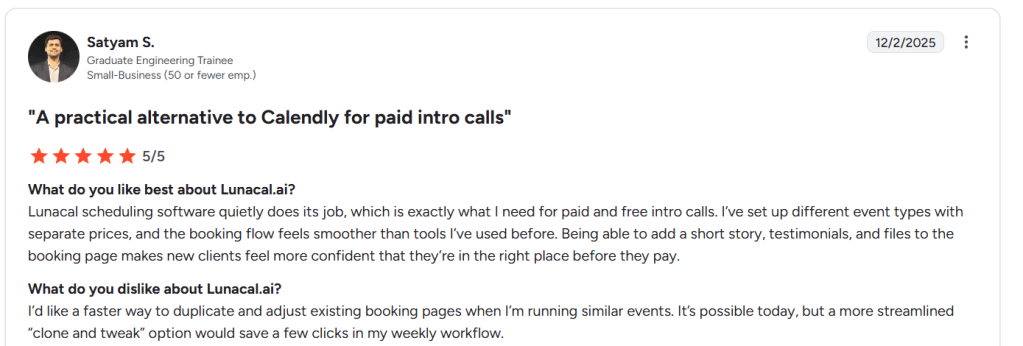
Real-time syncing with Google, Outlook, and Apple worked reliably during testing. Availability updates instantly, which is critical when multiple interviews are booked daily. That said, while configuring multiple event types, I noticed duplication takes extra steps. A G2 review echoed this exact issue, and I’m sharing a screenshot below to show how it impacts setup speed.
- Team Scheduling Logic
Round-robin and collective scheduling are easy to configure. Compared to traditional back-and-forth coordination, this removes most manual effort. It handled multi-interviewer scenarios cleanly, especially useful for panel interviews. - Booking Page Builder
This is where Lunacal clearly separates itself from standard tools. You can add company context, videos, and instructions directly on the booking page. A G2 reviewer mentioned how professional this feels for clients, and I agree. It improves candidate readiness. Screenshot shared below. - Automated Reminders Flow
Email and SMS reminders reduce no-shows without extra tools. Compared to manual follow-ups, this alone saves hours every week in active hiring cycles. - Payment Integration Setup
Stripe and PayPal integrations allow paid sessions if needed. While not core to hiring, it’s useful for agencies or consulting-style interviews. This flexibility is rarely seen in basic scheduling tools.
Red Flags
- For small businesses running structured hiring pipelines, Lunacal can fall short when deeper workflow automation is needed. It does not replace an ATS, and this limitation is noted in external reviews like Software Advice where users highlight missing advanced pipeline features.
- While setting up multiple teams and event types, the interface started to feel cluttered. It took extra time to understand how configurations relate to one another, especially in non-standard setups.
- Reporting and analytics are minimal. For teams wanting detailed hiring insights, external tools may still be required.
Pricing
- Standard Plan – Starts at $9/user/month with core scheduling, calendar sync, and integrations
- Teams Plan – Around $15/user/month with team scheduling and advanced coordination features
- Enterprise Plan – Around $25/user/month with custom integrations and support
Full breakdown available on the official pricing page: https://lunacal.ai/pricing
Lunacal’s pricing feels more accessible than most scheduling tools, especially for small businesses that need flexibility without high upfront costs.
Calendly
Intro
Calendly is one of the most widely used scheduling tools, and after setting it up multiple times, it’s clear why. It focuses on simplicity and reliability, making it a go-to choice for teams that want fast interview scheduling without complexity. Compared to more customizable tools like Lunacal, Calendly leans toward a clean, no-friction booking experience.
Who Should Use This Tool
- Small businesses that need quick, reliable interview scheduling without heavy setup
- Teams replacing manual email coordination with self-service booking links
- Recruiters handling consistent interview formats across roles
- Organizations that value stability and mature integrations over customization
- Teams that want minimal onboarding effort and fast adoption
Core Features
- Calendar Sync Engine
Calendly integrates seamlessly with Google and Outlook calendars. In testing, availability updates were accurate and instant. However, I noticed limitations when trying to configure private buffer events around meetings. A G2 review mentioned the same gap, and I’m sharing a screenshot below to highlight how this can affect scheduling control. - Self-Scheduling Flow
Candidates can book interviews directly based on real-time availability. This removes the typical back-and-forth emails. A G2 reviewer highlighted how this saved significant admin time in daily workflows, and I fully agree. It’s one of Calendly’s strongest advantages. Screenshot shared below. - Automated Reminder System
Built-in email reminders help reduce no-shows. Compared to manual follow-ups, this keeps interview pipelines running smoothly without extra tools. - Event Type Customization
You can create multiple interview types with different durations and rules. This works well for structured hiring, though it lacks the deeper personalization seen in tools like Lunacal. - Integration Ecosystem
Calendly connects easily with tools like Zoom, Google Meet, and CRMs. Compared to newer platforms, its integration depth is more mature and stable for everyday use.
Red Flags
- Customer support response times can be slow, especially for billing or technical issues. Multiple users on G2 report relying on help docs instead of direct assistance.
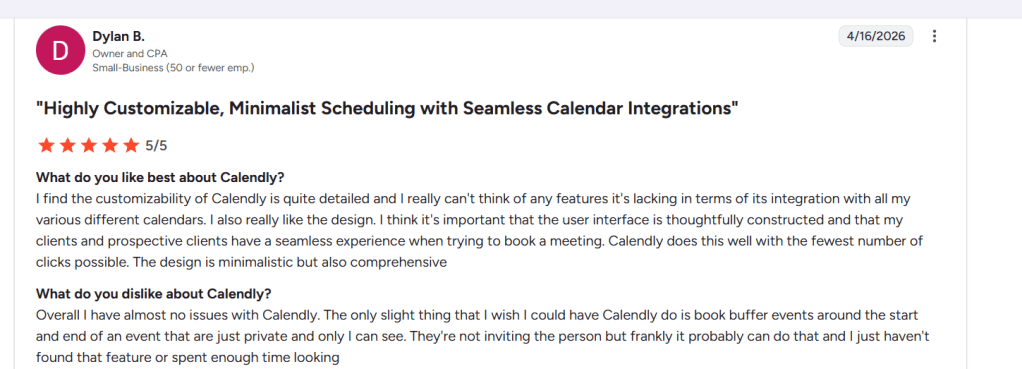
- Limited flexibility in advanced scheduling scenarios. Setting up nuanced workflows or hidden buffers takes extra effort and isn’t always intuitive.
- Branding and booking page customization are fairly basic, which can limit candidate experience for teams that want more control.
Pricing
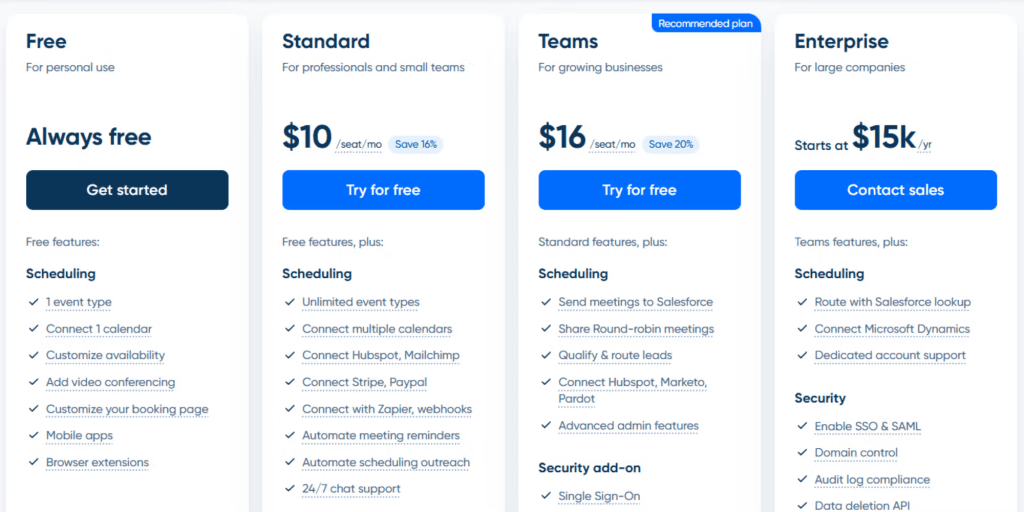
- Free Plan – Basic scheduling for individuals with limited features
- Standard Plan – Starts at $10/user/month with integrations and reminders
- Teams Plan – Around $16/user/month with team scheduling features
- Enterprise Plan – Custom pricing with advanced security and admin controls
Calendly remains one of the most cost-effective and stable options, especially for small businesses that prioritize ease of use over advanced customization.
GoodTime
Intro
GoodTime is built specifically for interview scheduling at scale, and that shows the moment you start configuring it. From my experience, it goes beyond basic booking links and focuses heavily on coordination across hiring teams. Compared to lightweight tools like Calendly, it’s designed for structured hiring environments where scheduling is deeply tied to recruiting workflows.
Who Should Use This Tool
- Small businesses moving toward structured hiring with multiple interview stages
- Recruiting teams coordinating across hiring managers, recruiters, and panels
- Companies already using an ATS and needing deeper scheduling automation
- Teams handling high candidate volume where manual coordination becomes a bottleneck
- Growing startups that want analytics and process visibility early
Core Features
- Automated Scheduling Engine
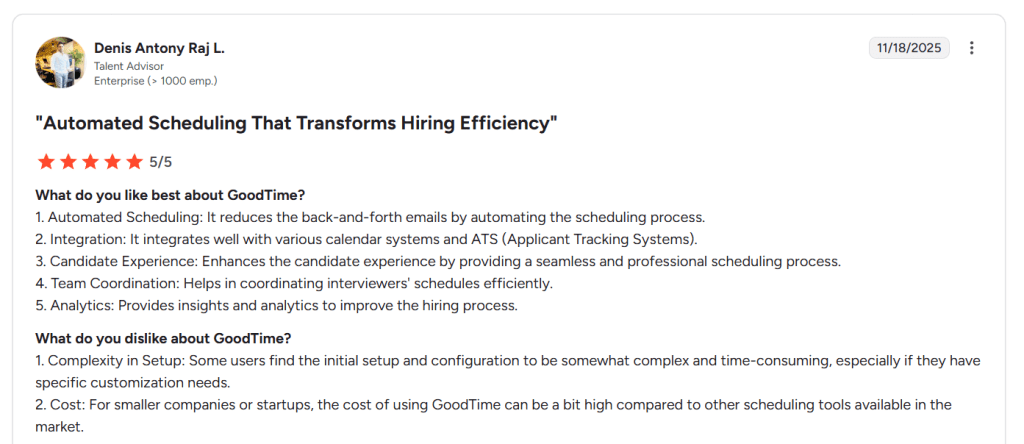
GoodTime removes much of the manual coordination by automating interview bookings across stakeholders. In testing, this worked well for multi-stage interviews. A G2 review also highlighted how it eliminates back-and-forth emails, which aligns with what I observed. - ATS Integration Layer
It integrates deeply with applicant tracking systems, which is where it stands apart from general tools. Compared to standalone schedulers, this keeps interview scheduling tightly connected to hiring pipelines. - Team Coordination System
Managing interviewer availability across teams felt structured and reliable. Panel interviews and interviewer load balancing are handled efficiently, which is critical in growing teams. - Candidate Experience Flow
The booking experience is smooth and professional. Candidates get clear scheduling options without confusion. A G2 reviewer specifically noted this improvement, and I agree it noticeably reduces friction. Screenshot shared below. - Hiring Analytics Dashboard
GoodTime provides insights into scheduling efficiency and interviewer utilization. This is something most basic tools don’t offer and becomes valuable as hiring scales.
Red Flags
- Setup took longer than expected. Configuring workflows, integrations, and rules required more effort, especially for non-standard hiring setups. This aligns with feedback seen on G2 review, where users mention initial complexity.
- Pricing can be a concern for small businesses. Compared to simpler tools, the cost may feel high if hiring volume is still low.
- Interface feels built for recruiting teams rather than general users, which adds a learning curve during onboarding.
Pricing
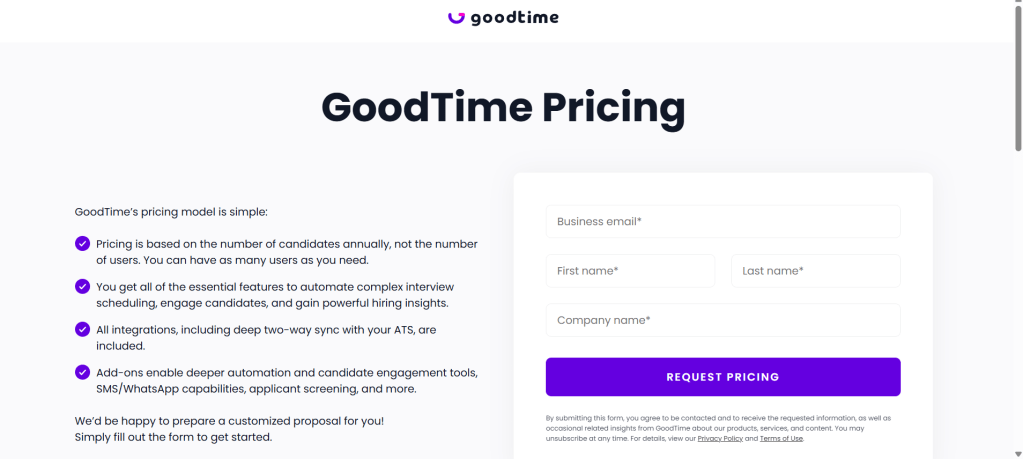
- Custom Pricing Model – No public base plan; pricing depends on company size and hiring needs
- Includes scheduling automation, ATS integrations, and analytics features
- Typically positioned for mid-sized teams and above
Full details available here: https://www.goodtime.io/pricing
GoodTime makes sense when interview scheduling becomes operationally complex, but for smaller teams, the cost and setup effort need to be justified by hiring volume.
HireVue
Intro

HireVue is best known for video-first interviewing, especially in large-scale hiring. From my experience setting it up, it goes beyond simple scheduling and moves into structured interview workflows. Compared to lightweight tools like Calendly, HireVue focuses more on screening and assessment rather than just booking interviews.
Who Should Use This Tool
- Small businesses handling high-volume hiring where screening efficiency matters
- Teams that want to standardize early-stage interviews with video responses
- Recruiters looking to reduce live interview time through pre-recorded answers
- Organizations hiring remotely and needing consistent evaluation formats
- Companies moving beyond basic scheduling into structured hiring workflows
Core Features
- Video Interview System
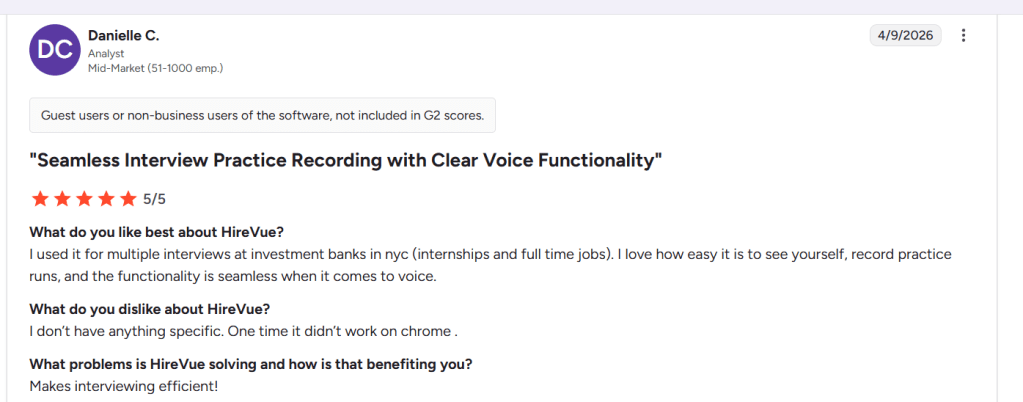
HireVue allows one-way and live video interviews with recording and playback. During testing, the ability to preview recordings and practice runs stood out. A G2 reviewer mentioned how seamless the recording experience felt, and I agree. It lowers candidate friction. Screenshot shared below. - Automated Interview Scheduling
Scheduling is built into the platform, though it feels secondary compared to dedicated tools. It works well for standard interview slots but lacks the flexibility of tools like Lunacal for managing complex availability. - Candidate Evaluation Tools
Built-in scoring and evaluation workflows help teams review candidates consistently. This is especially useful when multiple stakeholders are involved in hiring decisions. - AI Screening Capabilities
HireVue includes AI-driven assessments to analyze responses. While useful for scale, it requires careful use to ensure fairness and compliance in hiring decisions. - Enterprise Integrations
It connects with ATS platforms and enterprise HR systems. Compared to simpler tools, this makes it better suited to structured hiring environments.
Red Flags
- For small businesses focused purely on scheduling, HireVue can feel excessive. It introduces more steps than needed when simple booking tools would suffice.
- One-way video interviews can feel impersonal for candidates. This concern repeatedly surfaces in feedback and can affect how candidates perform during interviews.
- Occasional technical issues exist. A G2 reviewer noted a case where it did not work properly on Chrome, which can disrupt interview flow at critical moments.
Pricing
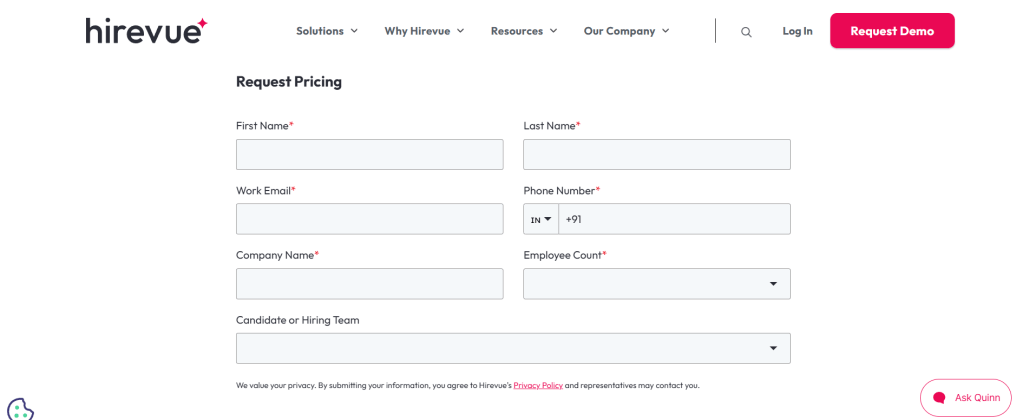
- Custom Pricing Only – No public entry-level pricing available
- Pricing depends on hiring volume, features, and enterprise needs
- Typically bundled with video interviewing and assessment tools
More details available here: https://www.hirevue.com/pricing
HireVue is better positioned as a full interview platform rather than a pure scheduling tool, making it more suitable for structured, high-volume hiring than simple interview coordination.
Paradox
Intro
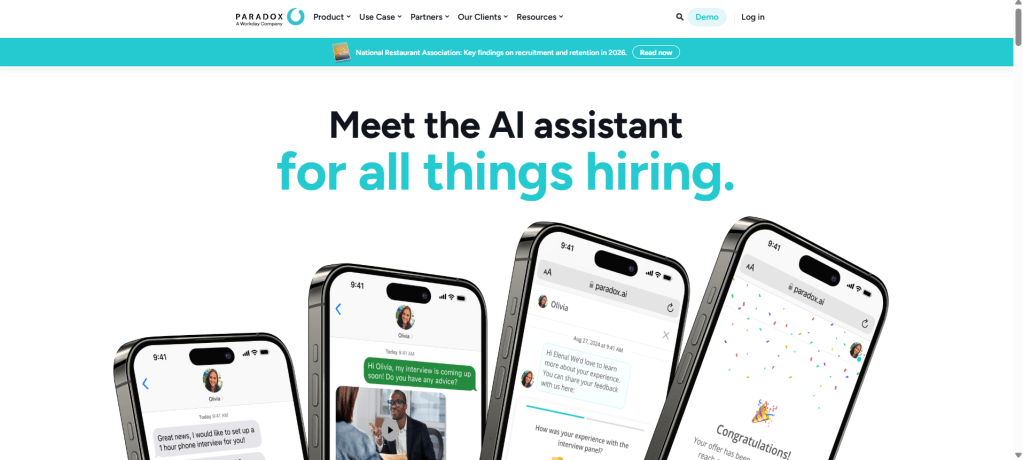
Paradox AI approaches interview scheduling very differently. Instead of relying on booking links, it uses conversational AI to interact with candidates and automatically schedule interviews. From my experience, it feels closer to a recruiting assistant than a scheduling tool. Compared to traditional tools like Calendly, it removes manual steps but introduces a new layer of automation.
Who Should Use This Tool
- Small businesses handling high applicant volume and needing automated scheduling
- Teams that want to reduce recruiter workload through AI-driven conversations
- Companies managing hourly or frontline hiring at scale
- Recruiters looking to automate candidate communication post-offer
- Organizations comfortable trading some control for speed and efficiency
Core Features
- Conversational Scheduling AI
Paradox automatically schedules interviews with candidates via chat or SMS. In testing, it significantly reduced manual coordination. However, I noticed conversations can sometimes go off track. A G2 review highlighted similar confusion, and I’m sharing a screenshot below to show how responses can misalign. - Automated Candidate Flow
The system handles interview scheduling, reminders, and post-offer communication in one flow. A G2 reviewer mentioned how helpful it is for managing candidates after offers, and I agree. It centralizes multiple steps into one system. Screenshot shared below. - Calendar Integration Layer
It syncs with recruiter calendars and automatically assigns interview slots. Compared to tools like Lunacal, this feels less manual but also less transparent in how scheduling decisions are made. - High Volume Automation
Designed for scale, Paradox can handle thousands of candidates simultaneously. This is especially useful for businesses hiring in bulk or across locations. - Recruitment Workflow Engine
It integrates with ATS systems and manages candidate pipelines beyond scheduling. This makes it more of a hiring assistant than a standalone scheduler.
Red Flags
- For small businesses that need precise control over interview scheduling, the AI-led conversations can introduce errors. Candidate responses may get misinterpreted, which can impact application quality. This issue is reflected in G2 feedback.
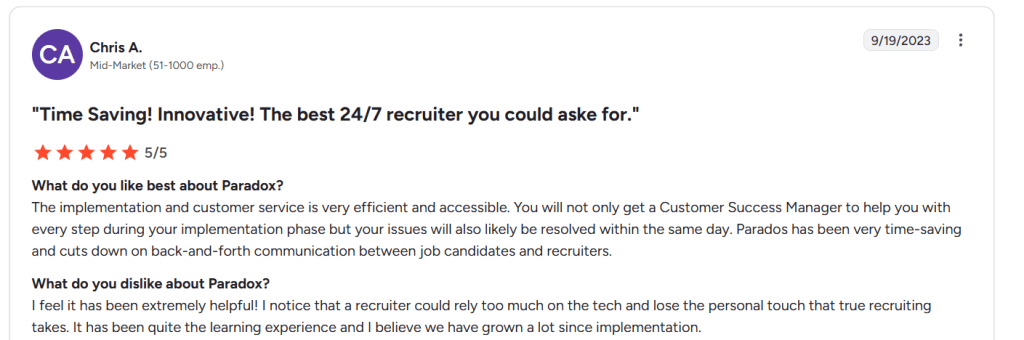
- The system can reduce the human touch in recruiting. Over-reliance on automation may weaken candidate relationships, especially in early-stage interviews.
- The initial setup and learning curve can be higher than with simple scheduling tools. Understanding how conversation flows work takes time.
Pricing
- Custom Pricing Only – No public pricing tiers available
- Pricing depends on hiring volume, automation scope, and integrations
- Typically bundled with ATS and recruiting automation features
More details available here: https://www.paradox.ai/pricing
Paradox works best as an automation layer for hiring rather than a pure scheduling tool, making it ideal for high-volume workflows but less suited for simple interview coordination.
Conclusion
If the goal is clean, efficient interview scheduling without friction, Lunacal stands out for small teams, while others fit more specific hiring workflows. From hands-on setup, the right choice comes down to how much automation, structure, or simplicity is actually needed.
- Lunacal works best for small businesses that want branded booking pages and strong team scheduling without heavy setup.
- Calendly fits teams that prioritize reliability, fast setup, and simple interview coordination at scale.
- GoodTime is better suited for structured hiring teams that need deeper coordination across interview panels.
- HireVue makes sense when video screening and structured evaluations are part of the hiring process.
- Paradox AI is ideal for high-volume hiring where automation replaces manual recruiter effort.
FAQs: Interview Scheduling Software for Small Businesses
1. What is interview scheduling software and why do small businesses need it?
Interview scheduling software automates booking interviews by syncing calendars, allowing candidates to self-schedule, and sending reminders. For small businesses, it reduces admin work and speeds up hiring.
2. Which interview scheduling tool is easiest to use?
Tools like Calendly are known for simplicity and quick setup, making them ideal for teams without technical resources.
3. Can interview scheduling tools handle multiple interviewers?
Yes, many tools support round-robin and panel scheduling. Lunacal and GoodTime are strong options for this.
4. How do these tools reduce no-shows?
They send automated email and SMS reminders, allow easy rescheduling, and provide clear booking confirmations to candidates.
5. Is interview scheduling software suitable for remote hiring?
Yes, most tools include timezone detection and integrations with video platforms like Zoom or Google Meet, making global hiring easier.
6. Do small businesses need an ATS along with scheduling software?
Not always. Scheduling tools work well independently for simple hiring workflows, but an ATS becomes useful when managing large candidate pipelines.
7. What features should I prioritize when choosing a tool?
Focus on calendar sync, team scheduling, reminders, booking page experience, and integrations with existing tools.

 OnlineSchedulingTools
Leave a comment