Key Summary
- Solo consultants & freelancers: Choose tools like Calendly or Cal.com for simple, fast booking with minimal setup
- Agencies & small teams: Lunacal stands out with round, robin scheduling, workflows, and branded booking pages
- Service businesses (coaching, clinics): SimplyBook.me and Setmore handle packages, recurring bookings, and payments well
- Best quick pick: Lunacal offers the most balanced mix of automation, team features, and conversion, focused booking pages
Intro
I didn’t realise how much time I was losing for scheduling emails until I tracked it, almost 6, 8 hours a week. That’s a big burden on any small business striving to be lean. From my experience researching and dealing with service, based SMBs, scheduling is not just about booking slots, it’s about reducing no, shows, managing numerous services and keeping client communication tight without adding expense.
Three things most small businesses struggle with are availability across time zones, collecting payment upfront, and staff schedule coordination without disruption. I looked at a number of Lunacal, like scheduling applications against a set of solid criteria to properly evaluate this functionality, pricing transparency, integrations, real user feedback, and documentation. I also cross, referenced the claims against G2 reviews, official price pages and product docs to make sure they were accurate (and relevant for worldwide users, especially in regions like India).
Here, you’ll learn about the top Lunacal alternatives, their unique features, and most importantly, which one fits your business model without making things complicated.
| Feature / Tool | Lunacal | Calendly | Cal.com | Setmore | SimplyBook.me |
| Rating (G2) | 4.9 ⭐⭐⭐⭐⭐ | 4.7 ⭐⭐⭐⭐ | 4.7 ⭐⭐⭐⭐ | 4.6 ⭐⭐⭐⭐ | 4.5 ⭐⭐⭐⭐ |
| Starting Price ($) | $9 | $10 | $0 | $5 | $9.9 |
| Calendar Sync | Google, Outlook, Apple | Google, Outlook | Google, Outlook | Google, Outlook | Google, Outlook |
| SMS/Email Reminders | Yes | Yes | Partial | Yes | Yes |
| Paid Meetings | Yes (Stripe, PayPal) | Yes (Stripe, PayPal) | Yes (Stripe) | Yes (Stripe, Square) | Yes (Stripe, PayPal) |
| Scheduling Page Themes | Yes | Partial | Yes | Yes | Yes |
| Team Scheduling | Yes | Yes | Yes | Yes | Yes |
| Round Robin Scheduling | Yes | Yes | Yes | No | No |
| Multi, session Packages | Yes | No | Partial | Yes | Yes |
| Custom Domain | Yes | Yes | Yes | Partial | Yes |
| GDPR Compliance | Yes | Yes | Yes | Yes | Yes |
What Features Should You Look for in Scheduling Software?
- Calendar sync that works, always, every time. Real, time sync with Google, Outlook and Apple to prevent multiple bookings. This is important if customer calls clash with internal meetings or personal blocks.
- Easy booking flow and make payments. The tool needs to collect fees upfront and validate immediately. This decreases no, shows and eliminates the need to chase for money later, especially for consultants or clinics.
- It should be easy to set up automated email or SMS reminders. A clear reschedule or cancel flow saves time and makes the client experience seamless.
- Look at the team’s scheduling and routing logic. Round, robin or group booking is good for distributing leads or coordinating group calls. This is crucial when more than one person is handling bookings.
- Take a look at branding, reporting and growth agility. A professional booking page builds trust. Basic statistics reveal patterns in bookings. Migration shouldn’t seem like starting over when you scale.
Tools That Are Worth Your Time: In, Depth Comparisons
Lunacal
Intro
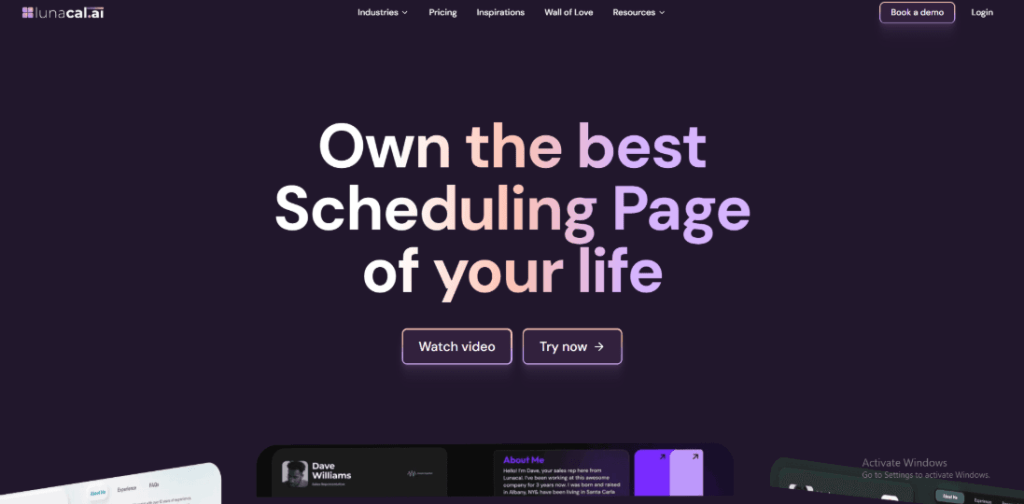
From setting it up myself, Lunacal stands out as a scheduling tool built for conversion, not just availability sharing. While most general tools focus on basic booking links, Lunacal leans into branded booking pages, workflows, and team coordination. It feels closer to a lightweight business system than a simple scheduler, which makes it especially useful for small businesses handling multiple services or client types.
Who Should Use This Tool
- Service, based small businesses like consultants, agencies, and coaches who need branded booking pages that convert visitors into paying clients
- Teams managing inbound leads where round, robin distribution keeps response time fast
- Businesses offering paid sessions, packages, or recurring bookings without adding extra tools
- Founders who want fewer back, and, forth emails and more automation baked into scheduling
- Small teams scaling operations where coordination across multiple calendars becomes messy
Core Features
- Calendar Sync Engine
Syncs Google, Outlook, and Apple calendars in real time. During setup, availability rules felt flexible, especially for handling buffers and time zones. However, I noticed in a G2 review that duplicating similar event types takes extra effort. I’m sharing a screenshot below that reflects this limitation. - Paid Booking Flow
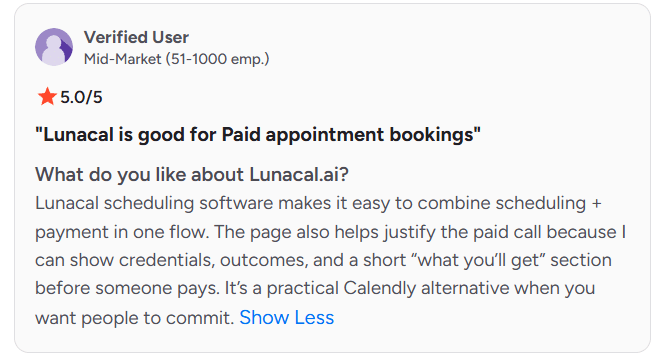
Combines scheduling with payments in one step using Stripe or PayPal. This is where Lunacal clearly outperforms generalist tools. A G2 reviewer mentioned how the page helps justify paid calls with context and outcomes. I agree, especially for high, ticket services. Screenshot referenced below.
- Round Robin Routing
Distributes bookings across team members automatically. In practice, this works smoothly and is more intuitive than many tools where routing logic feels buried. - Booking Page Builder
Lets you add branding, service descriptions, and structured sections. Compared to standard scheduling pages, this feels closer to a landing page. One G2 review highlighted how professional it looks. I found that accurate, especially for first, time client impressions. - Workflow Automation
Handles reminders, follow, ups, and pre, meeting emails. This reduces manual coordination and keeps communication consistent without needing extra tools.
Red Flags
- For small businesses managing multiple similar services, duplicate workflows are inefficient. Creating variations of the same booking type takes longer than expected, as also noted in this Lunacal G2 Reviews feedback.
- Pricing scales per user, so small teams growing quickly may see costs rise faster than expected.
- During setup, some advanced workflows required extra steps that weren’t immediately obvious, which slowed initial configuration.
Pricing
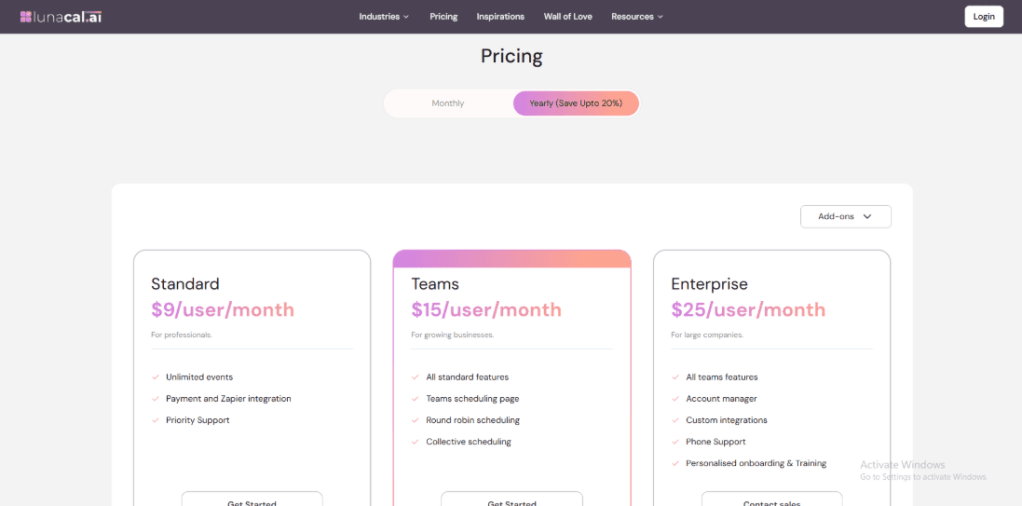
Pricing is structured per user and becomes more valuable as team features are used.
- Standard starts at $9 per user per month and covers core scheduling, calendar sync, and booking pages
- Teams starts at $15 per user per month with round robin and team scheduling
- Enterprise starts at $25 per user per month with advanced integrations and onboarding
Full pricing details are available on the official Lunacal pricing page.
Calendly
Intro
After setting up Calendly across a few client projects, it’s clear why it’s the default choice for scheduling. It’s known for simplicity and reliability, especially for small businesses that just want bookings to work without friction. Compared to more advanced tools like Lunacal, Calendly sticks to clean, no, nonsense scheduling, ideal when speed and ease matter more than deep customization or sales, driven booking flows.
Who Should Use This Tool
- Solo founders and small teams needing quick, reliable scheduling
- Businesses that don’t require complex workflows or paid bookings upfront
- Teams already using Google or Outlook heavily for calendar management
- Customer, facing roles like onboarding, sales, or support calls
- Small businesses that value ease of use over advanced funnel, style booking pages
Core Features
- Calendar Integration Core
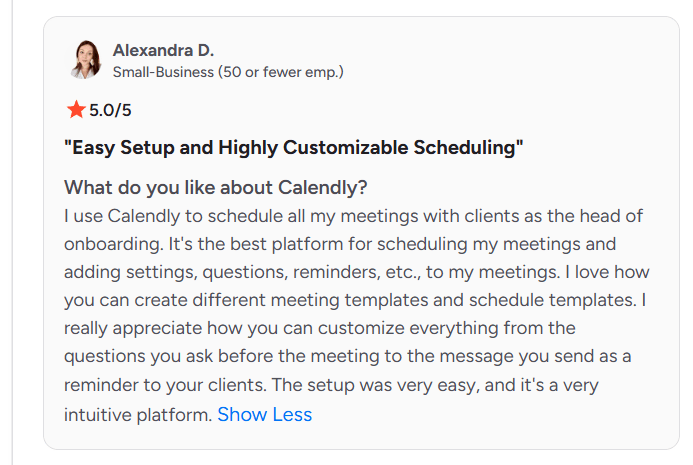
Connects with Google and Outlook calendars to prevent double bookings. In practice, syncing works reliably, though setup can take a bit of figuring out. I also saw this reflected in a G2 review mentioning difficulty connecting multiple calendars—I’m sharing a screenshot below.
- Custom Event Types
Lets you create different meeting templates with durations, buffers, and availability rules. This is where Calendly shines for everyday use. However, I noticed (and confirmed via a G2 review) that managed event sharing uses a fixed email format, which adds friction when sending one, off invites. - Booking Link Simplicity
Generates clean, shareable links that work instantly. Compared to tools like Lunacal, this is more minimal—no heavy branding—but much faster to deploy. - Reminders and Notifications
Automated email and SMS reminders reduce no, shows. A G2 reviewer praised how customizable reminders and pre, meeting questions are, and I agree, it’s one of the easiest systems to configure. Screenshot referenced below. - Team Scheduling Options
Supports round, robin and collective scheduling. Works well for small teams, though routing logic is less flexible compared to more advanced scheduling systems.
Red Flags
- Managed event sharing lacks editable email templates, which creates repeated manual work in real workflows. This limitation shows up clearly in Calendly G2 Reviews feedback.
- Multi, calendar setup and shared visibility can feel slightly confusing during onboarding, especially for teams.
- Limited customisation on booking pages makes it less suitable for businesses that rely on branding or conversion, driven scheduling.
Pricing
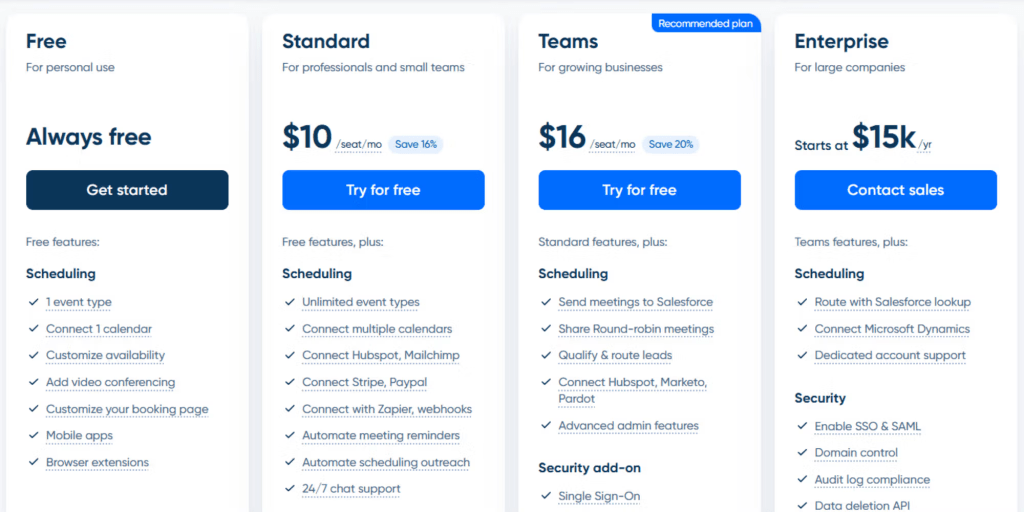
- Free plan available with basic features
- Standard: $10/user/month
- Teams: $16/user/month
- Enterprise: Custom pricing
Full details available on the official pricing page: Calendly Pricing
From experience, the free plan is enough for simple use cases, but growing teams will likely need paid tiers for collaboration and automation.
Cal.com
Intro
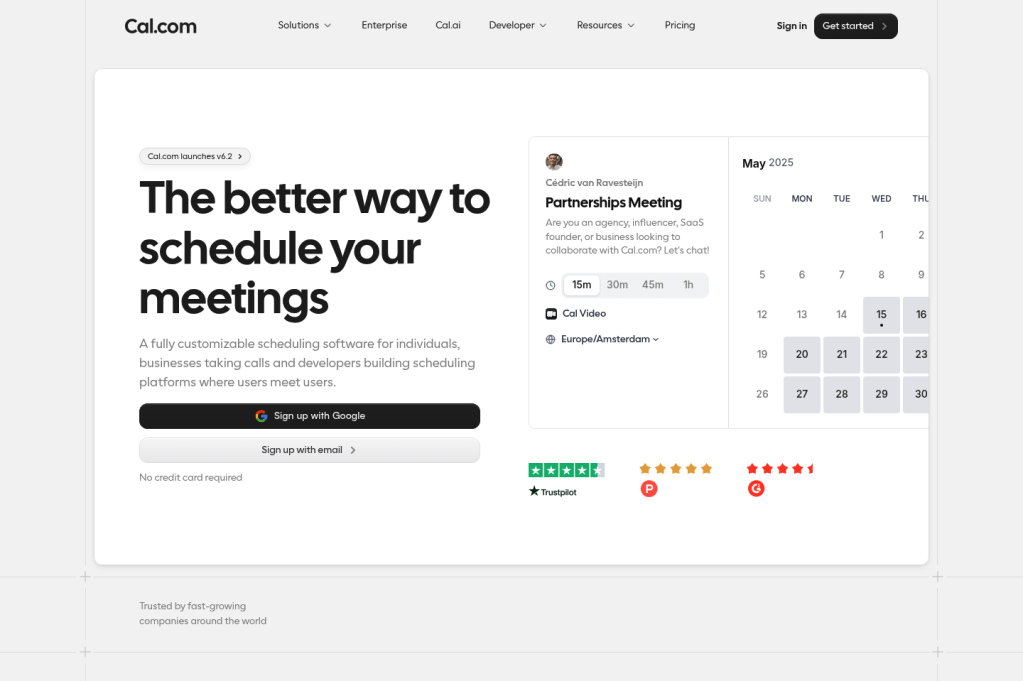
After testing Cal.com, it’s clear this tool is built with flexibility at its core. It’s often positioned as an open, source alternative to Calendly, but in practice, it goes beyond that. For small businesses that want control over workflows, integrations, and even hosting, Cal.com offers a level of customisation that most standard scheduling tools simply don’t match.
Who Should Use This Tool
- Small businesses with technical flexibility needs or custom workflows
- Teams already using tools like Zoom, Google Calendar, or CRMs extensively
- Founders who want ownership or control over scheduling infrastructure
- Agencies or SaaS teams needing embedded scheduling inside products
- Businesses comfortable spending time configuring settings for long, term flexibility
Core Features
- Calendar Integration Hub
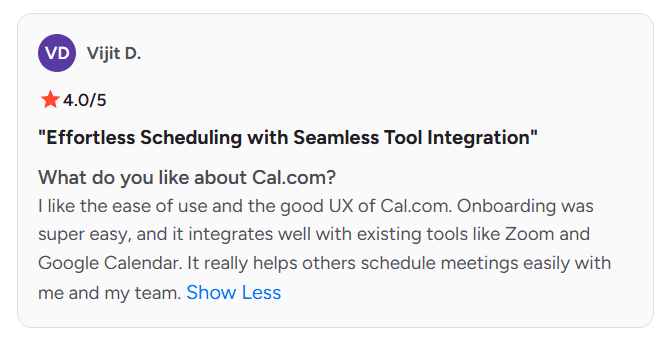
Connects with Google, Outlook, and other calendars smoothly. During setup, syncing worked reliably, especially for avoiding conflicts across multiple calendars. A G2 reviewer also highlighted how well it integrates with tools like Zoom and Google Calendar, I agree, this part feels polished. Screenshot referenced below. - Custom Workflow Engine
Allows deep customization of booking rules, routing, and logic. This is where Cal.com differs from general tools. However, I noticed the setup can feel dense, which aligns with a G2 review mentioning the experience feels slightly developer, first. Screenshot referenced below. - Open Source Control
Offers self, hosting and code, level customization. For small businesses with technical support, this is a major advantage over closed platforms, especially when data control or customization is important. - Embedded Scheduling
Lets you embed booking flows directly into websites or apps. This works well for product, led businesses or agencies wanting scheduling inside their own platforms rather than redirecting users. - Team Scheduling Logic
Supports round, robin and collective scheduling. In testing, it handled team availability well, though configuration required more steps compared to simpler tools.
Red Flags
- Initial setup takes longer than expected. With many options and integrations, it’s easy to lose time figuring out where settings live, especially for non, technical users.
- Some features feel built with developers in mind, which can slow down small business owners who just want a quick, clean setup.
- Interface clarity varies across sections, so making quick edits later is not always straightforward.
Pricing
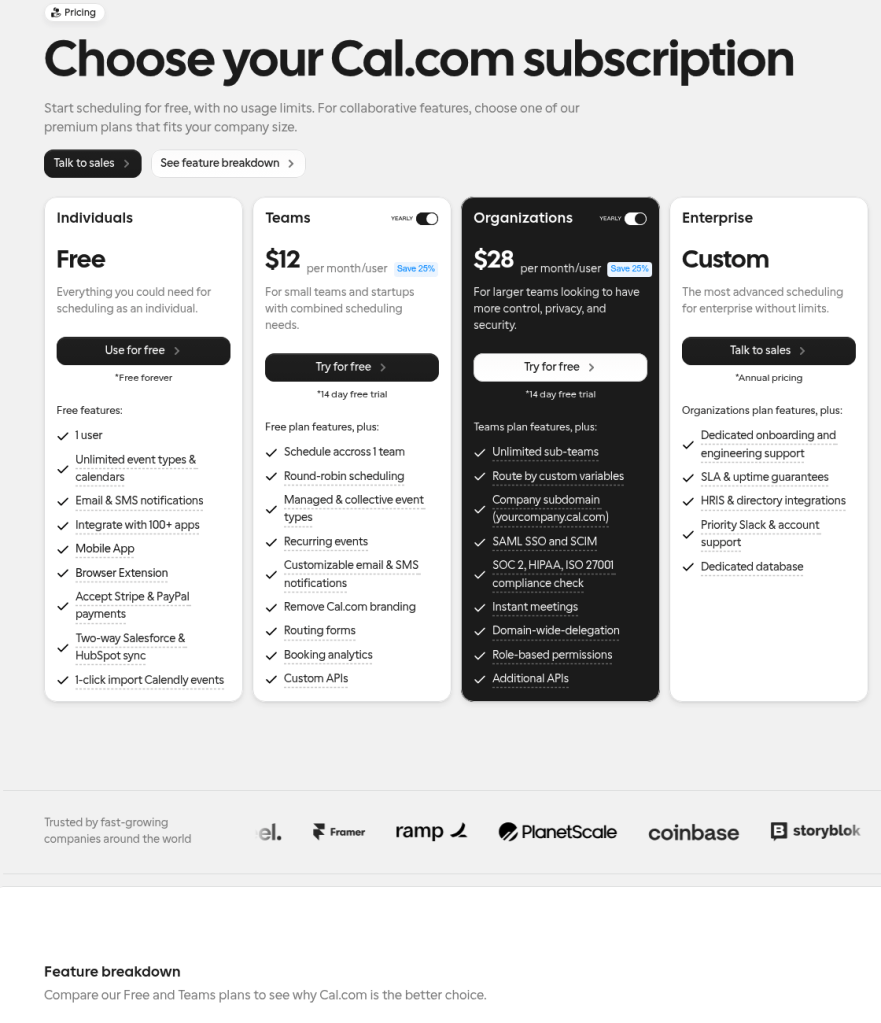
- Free plan available (basic features)
- Teams plan: ~$15/user/month
- Enterprise: Custom pricing
Full details available on the official pricing page: Cal.com Pricing
From experience, the free tier is generous, but the real value shows when a business needs deeper customization or integration control.
Setmore

Intro
After testing Setmore, it feels like a straightforward scheduling system built for service businesses that need quick setup and public booking pages. It leans more toward simplicity than advanced workflow depth. Compared to tools like Lunacal that focus on conversion and automation, Setmore sticks closer to traditional appointment management, which works well for small businesses that want reliability without complexity.
Who Should Use This Tool
- Small businesses offering in, person or virtual appointments like salons, clinics, tutors
- Teams that need public booking pages with internal control
- Businesses managing multiple staff calendars without complex routing
- Owners who want simple scheduling with minimal setup time
- Early, stage SMBs not ready for advanced workflow, heavy tools
Core Features
- Public Booking Page
Setmore gives you a ready, to, use booking page where clients can schedule directly. In my setup, this worked quickly and felt practical. A G2 review mentioned how businesses can manage public bookings while controlling availability internally, which matches my experience. Screenshot referenced below. - Calendar Sync System
Integrates with Google Calendar to avoid conflicts. However, I did notice occasional sync inconsistencies. A G2 reviewer pointed out that reconnections are sometimes needed, and I ran into a similar situation during testing. - Service & Staff Management
You can define services, durations, and assign them to team members. This works well for small teams, though it lacks the deeper routing logic seen in more advanced tools. - Multi, Channel Booking
Supports bookings via website, social platforms, and direct links. Compared to generalist tools, this feels more tailored to local service businesses trying to capture bookings from multiple entry points. - Reminders & Notifications
Automated email and SMS reminders help reduce missed appointments. Setup is simple and effective without requiring complex workflows.
Red Flags
- Limited flexibility in scheduling rules. For example, assigning a service to specific days only is not supported cleanly, which can disrupt workflows for small businesses with structured availability.
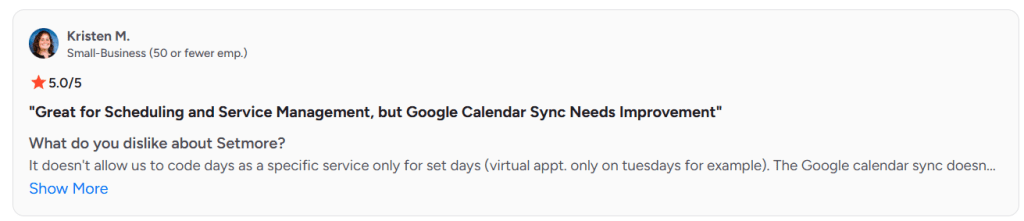
- Calendar sync reliability can be inconsistent at times. I had to reconnect Google Calendar during testing, which aligns with user feedback.
- Lacks advanced automation and routing features, so scaling beyond basic scheduling may require switching tools.
Pricing
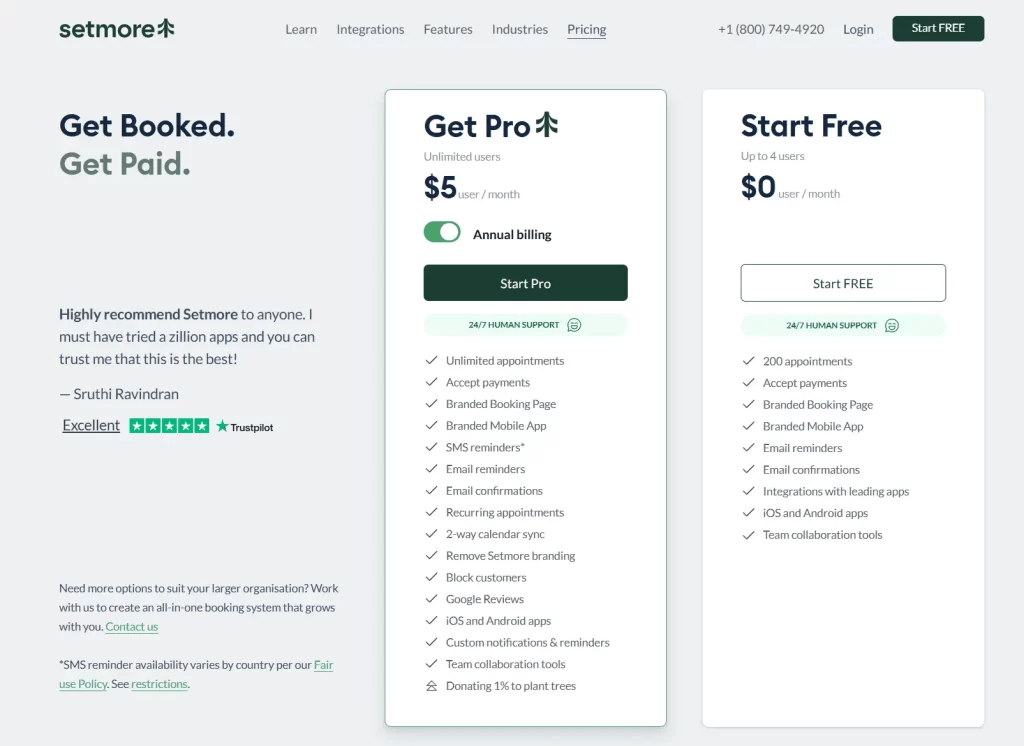
- Free plan available (basic features)
- Paid plans start around $5/user/month
- Premium tiers unlock SMS, integrations, and additional features
Full pricing details available here: Setmore Pricing
SimplyBook.me
Intro
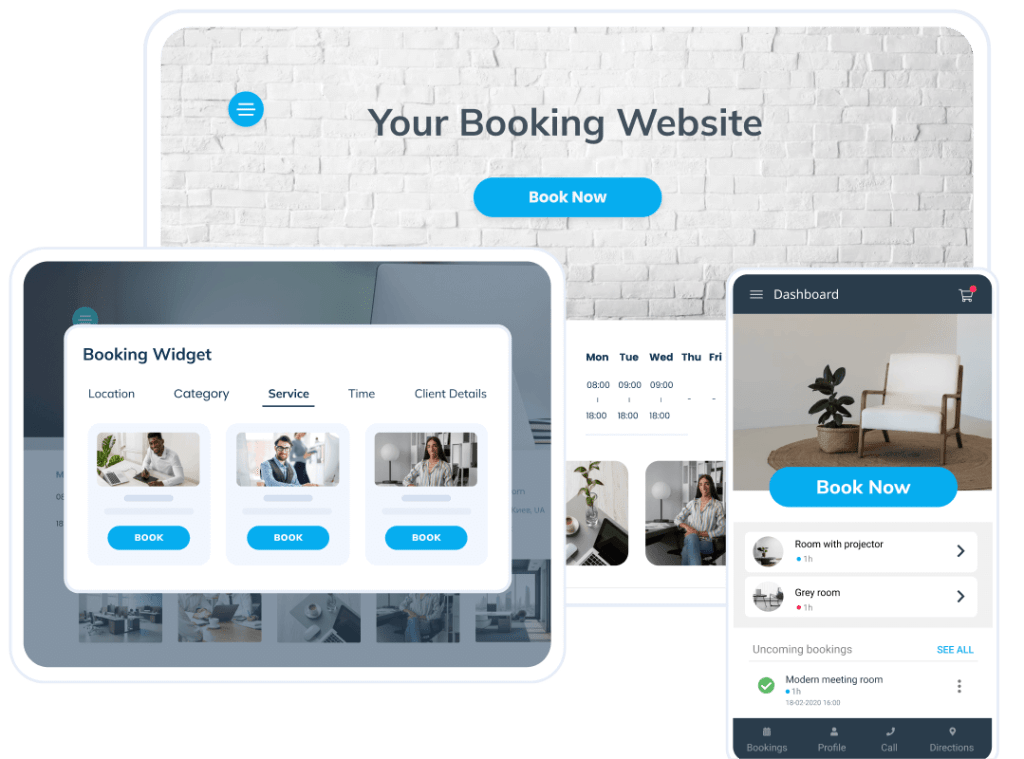
After setting up SimplyBook.me, it’s clear this tool is built for service, heavy small businesses that need more than basic scheduling. It leans toward appointment management with extras like classes, memberships, and client systems. Compared to simpler tools, this feels closer to a full booking platform, especially useful when operations go beyond one, off meetings.
Who Should Use This Tool
- Clinics, salons, and local service businesses handling repeat appointments
- Small businesses offering packages, memberships, or classes
- Teams managing both online and in, person bookings
- Businesses needing client profiles and history tracking
- Owners comfortable spending time configuring a more detailed system
Core Features
- Service Booking System
Lets you define multiple services with durations, pricing, and staff assignments. While powerful, setup took longer than expected. I also came across a G2 review mentioning manual configuration takes time, which aligned with my experience. - Multi, session Packages
Enables bundling sessions or selling subscriptions. This is something general scheduling tools rarely handle well, making it valuable for coaching or wellness businesses. - Time Zone Handling
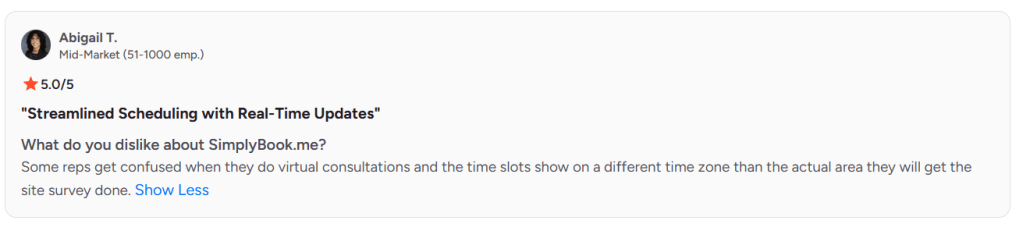
Automatically adjusts bookings across locations. That said, I noticed some inconsistencies during virtual bookings, and a G2 review highlighted confusion when time zones didn’t match expected service locations. Screenshot referenced below. - Custom Booking Website
Provides a hosted booking page with branding and service listings. Compared to standard tools, this feels more like a mini website than just a scheduler. - Payment Integration
Supports Stripe, PayPal, and other gateways. This works reliably and is essential for businesses collecting payments upfront.
Red Flags
- Time zone handling can create confusion in virtual consultations, especially when service location differs from booking location. This issue is also reflected in SimplyBook.me G2 Reviews feedback.
- Initial setup requires patience. Configuring services, providers, and workflows takes time before things run smoothly.
- The interface can feel dense at first, especially for small teams expecting a simpler setup.
Pricing
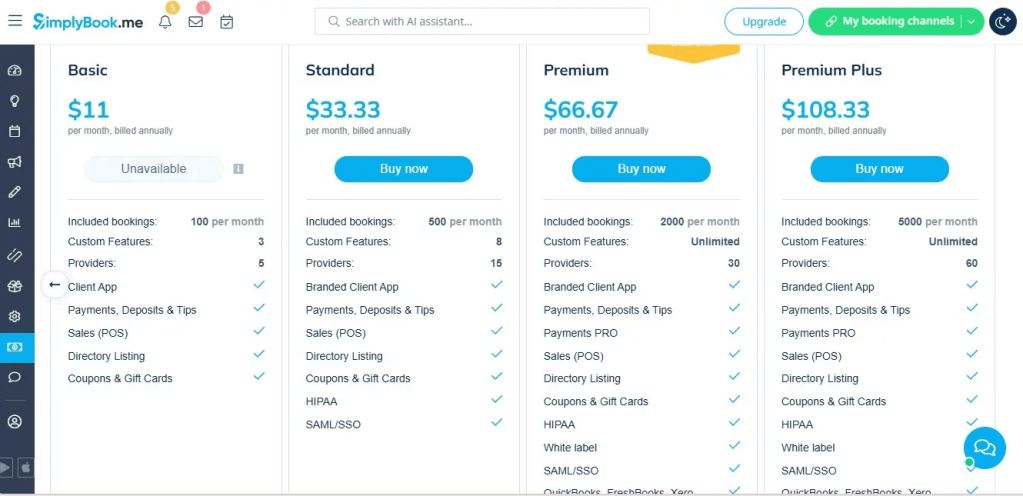
- Free plan available (limited features)
- Basic: ~$9.9/month
- Standard: ~$29.9/month
- Premium: ~$59.9/month
Full pricing details available here: SimplyBook.me Pricing
Conclusion
If quick bookings are the goal, go simple. If bookings are tied to revenue and team workflows, go deeper. After testing these tools, Lunacal stands out when scheduling directly impacts conversions, while others fit better for lighter or more operational use cases.
- Lunacal works best for consultants, agencies, and small teams selling paid calls or managing lead distribution
- Calendly fits solo users who want fast setup and minimal friction without extra configuration
- Cal.com suits tech, savvy teams needing flexibility and customization control
- SimplyBook.me is ideal for clinics, salons, and service businesses handling repeat bookings or memberships
- Setmore works well for small teams needing basic scheduling with some payment support
The right pick becomes clear once you map scheduling to how money, clients, and time actually flow in your business.
FAQs for Scheduling Software in Small Business
1. What is the best scheduling software for small businesses?
The best tool depends on use case. Lunacal is strong for paid bookings and team workflows, while Calendly is better for simple scheduling needs.
2. Which scheduling software supports payments?
Tools like Lunacal, SimplyBook.me, and Setmore allow businesses to collect payments during booking using Stripe or PayPal integrations.
3. Is there free scheduling software available?
Yes, tools like Cal.com and Setmore offer free plans, though features like automation and integrations are limited.
4. How do scheduling tools reduce no, shows?
They send automated email or SMS reminders and often require upfront payments, which increases commitment.
5. Can scheduling software handle team bookings?
Yes, many tools support round, robin or collective scheduling, helping distribute meetings across team members efficiently.
6. What features matter most for service-based businesses?
Key features include payment integration, recurring bookings, client management, and flexible availability settings.
7. Is scheduling software useful for international clients?
Yes, most modern tools automatically adjust time zones, making it easy to book across regions without confusion.
 OnlineSchedulingTools
Leave a comment