Key Summary
- Solo trainers & coaches: Use Lunacal for branded booking pages + payments,ideal if you sell programs or sessions online.
- Small studios (2–5 trainers): Acuity Scheduling or Calendly balance automation, affordability, and ease of setup.
- Growing fitness businesses: Vagaro offers client management, marketing, and booking in one system.
- Large gyms & chains: Mindbody delivers full operations, memberships, reporting, and discovery marketplace.
Best Fitness Class Booking System Tools for Fitness Class Bookings
I didn’t realize how much revenue was slipping through the cracks until I audited my class bookings,empty slots, missed payments, and constant rescheduling. The shift is clear: the online booking market is growing rapidly toward a $1.5B industry, driven by automation and self-service scheduling.
Working closely with fitness professionals, I’ve seen three consistent friction points: managing group class capacity without chaos, reducing no-shows, and handling payments without manual follow-ups. These aren’t minor inefficiencies; they directly impact retention and revenue.
To evaluate the best tools, I focused on what actually matters in fitness businesses: scheduling flexibility, automation depth, payment integration, and scalability. Every tool here was cross-checked using official documentation, pricing pages, and verified reviews from platforms like G2 and Capterra, including usability across regions.
This guide will help you quickly identify the right tool, whether you’re a solo trainer, a boutique studio, or scaling a multi-trainer operation, and confidently choose one that fits your workflow today.
Best Fitness Class Booking System Features Comparison Table
| Feature | Lunacal | Calendly | Acuity Scheduling | Mindbody | Vagaro |
| G2 Rating | 4.9 ⭐⭐⭐⭐⭐ | 4.7 ⭐⭐⭐⭐ | 4.7 ⭐⭐⭐⭐ | 4.0 ⭐⭐⭐⭐ | 4.7 ⭐⭐⭐⭐ |
| Starting Price | $9 | $10 | $16 | $99 | $23.99 |
| Calendar Sync | Google, Outlook, Apple | Google, Outlook | Google, Outlook, iCal | Yes | |
| Reminders | Yes | Yes | Yes | Yes | Yes |
| Payments | Yes (Stripe, PayPal) | Partial | Yes | Yes | Yes |
| Branding | Yes | Partial | Yes | Yes | Partial |
| Team Scheduling | Yes | Yes | Partial | Yes | Yes |
| Round Robin | Yes | Yes | No | No | No |
| Packages | Yes | No | Yes | Yes | Yes |
| Custom Domain | Yes | No | Yes | Yes | No |
| GDPR | Yes | Yes | Yes | Yes | Yes |
What features should you look for in a new tool?
- Class scheduling + capacity control
Ensure the system supports group bookings with limits per class. A yoga studio with 12 mats needs automatic cutoffs and waitlists to avoid manual tracking. - Payments, packages, and subscriptions
Built-in payments simplify revenue. Look for options to sell class bundles or monthly plans so clients can book faster without extra steps. - Reminders and rescheduling flow
Automated SMS or email reminders reduce no-shows. A clean rescheduling flow helps clients adjust bookings without contacting staff. - Calendar sync and availability rules
Real-time sync with Google or Outlook prevents double bookings. Buffer times between sessions help trainers stay on schedule. - Branding, team workflows, and reporting
A polished booking page builds trust. Team scheduling, routing, and basic reports help track attendance trends and trainer performance.
Tools worth considering for your fitness booking workflow
Here’s how the top platforms actually perform when tested against real fitness business needs:
Lunacal
Intro
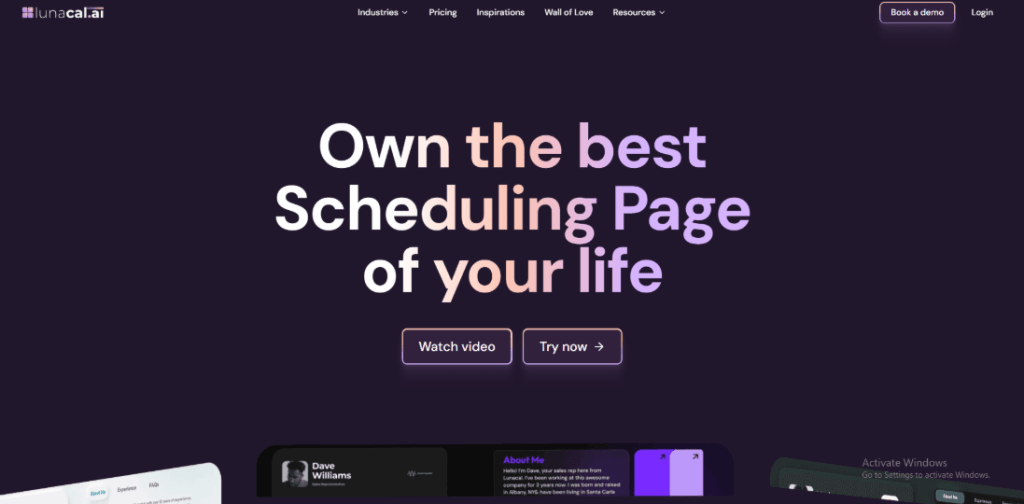
After setting up Lunacal for a few fitness workflows, it quickly became clear why it stands out. It’s widely known for turning booking pages into conversion assets. Compared to standard schedulers that just fill time slots, Lunacal helps present classes, trials, and coaching sessions in a way that actually drives sign-ups.
Who Should Use This Tool
- Solo trainers and online coaches who sell sessions or programs and need a polished booking flow that converts visitors into clients
- Boutique fitness studios that rely on branded experiences rather than marketplace discovery
- Teams running intro calls or trial classes before selling memberships
- Fitness businesses prioritizing client experience and automation over heavy operational systems
Core Features
- Branded booking pages
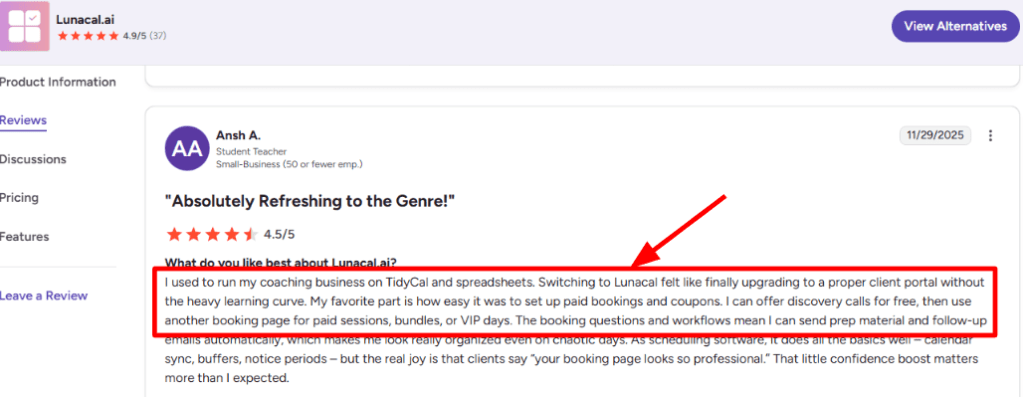
This is where Lunacal stands out. Booking pages feel like mini landing pages with videos, testimonials, and clear calls to action. A G2 reviewer mentioned how professional the flow feels for clients, I agree, especially for fitness coaches selling premium programs. Screenshot shared below.
- Flexible event setup
You can create multiple class types, durations, and formats easily. However, while testing, duplicating event types wasn’t straightforward. - Payment integrations
Stripe and PayPal work smoothly for paid classes or consultations. This removes the need for separate invoicing tools, which is a common workaround in simpler schedulers. - Calendar sync controls
Syncing with Google and Outlook was reliable. Availability rules, buffers, and time zone handling worked well, especially for online coaching setups where scheduling conflicts can quickly escalate. - Automation workflows
Reminders and follow-ups are easy to configure. Compared to traditional booking setups where reminders are manual or inconsistent, this significantly reduces no-shows.
Red Flags
- For structured class management, it starts to break down. There’s no true attendance tracking or advanced capacity handling, which becomes limiting for gyms. The review flags that duplicating and tweaking similar class pages still takes a few extra clicks.
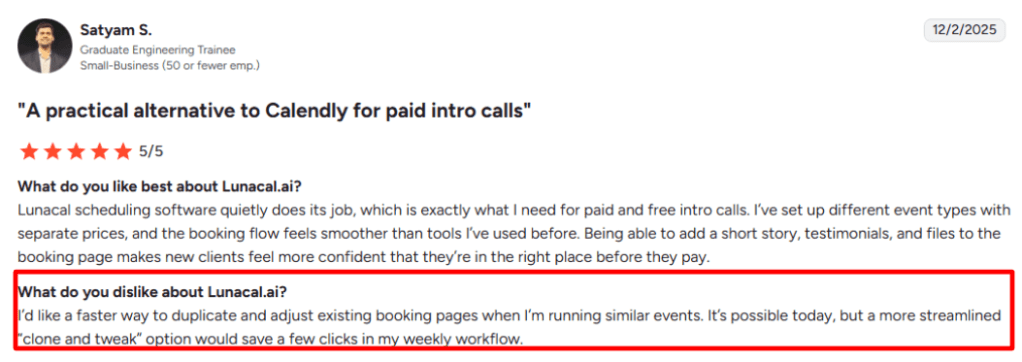
- Setup friction appears when scaling across multiple similar classes. Without easy duplication, creating multiple variations takes longer than expected.
Pricing
- Starts at around $9 per user per month
- Team and higher tiers unlock advanced workflows and integrations
- No platform commission on payments, only standard gateway fees apply
- SMS reminders may add extra usage costs
- Full pricing details available on the Lunacal pricing page.
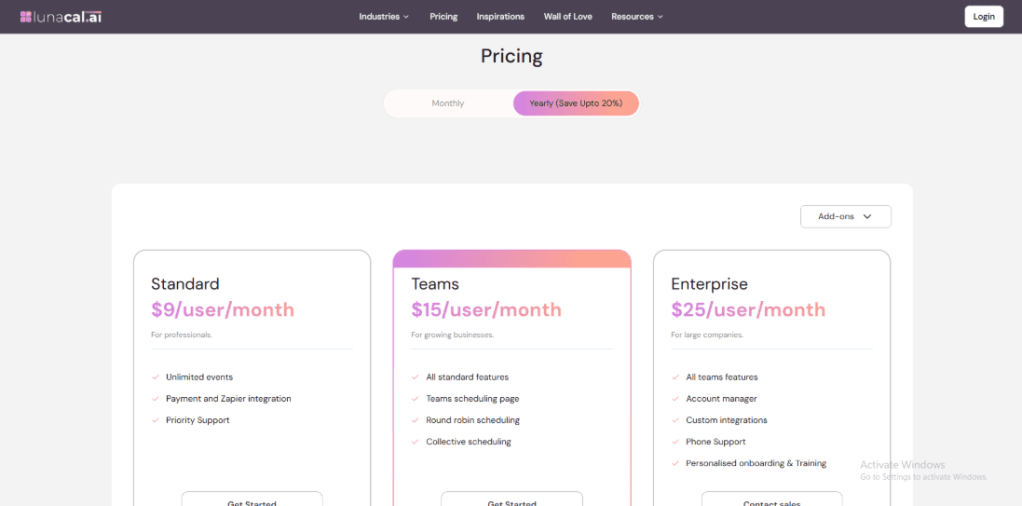
Overall, pricing feels competitive, especially when compared to tools that charge more but offer less branding control.
Calendly
Intro
Calendly is widely known as one of the simplest ways to eliminate back-and-forth scheduling. After setting it up for a small training studio, it became clear why it’s so popular: clean interface, fast booking links, and reliable automation. Compared to traditional phone or WhatsApp bookings, it feels structured and scalable. Against more complex fitness systems, it’s lighter and quicker to deploy.
Who Should Use This Tool
- Solo trainers offering 1:1 coaching sessions who need quick booking links without technical setup
- Online fitness coaches managing clients across time zones with simple availability rules
- Small studios testing digital bookings before committing to heavier gym software
- Businesses prioritizing speed and simplicity over deep class management features
- Teams that don’t need complex workflows like attendance tracking or memberships
Core Features
- Calendar sync
Syncs with Google and Outlook instantly. I found this critical for avoiding double-bookings when trainers manage their personal and business calendars together. Users report that availability doesn’t always reflect correctly, which can lead to double bookings or missed meetings. In some cases, even when a slot is marked busy, it still appears open for booking. - Availability controls
You can define working hours, buffers, and booking limits. This works well for spacing out personal training sessions, though less flexible than full gym systems. - Automated reminders
Email reminders are reliable and easy to configure. This reduced no-shows noticeably, especially for first-time clients. Several users highlight that important features are locked behind paid tiers, and the system can feel restrictive when trying to customize workflows or availability. This becomes a limitation for more advanced scheduling needs. - Meeting integrations
Integrates with Zoom and Google Meet automatically. For online fitness classes, links are generated instantly after booking. - Team scheduling
Supports round-robin assignment. Helpful when multiple trainers share incoming leads, though it lacks deeper class allocation logic.
Red Flags
- Group class workflows feel limited. Calendly doesn’t fully support class capacity, waitlists, or recurring sessions, which are essential for fitness studios. This gap is frequently noted in user feedback on G2.
- Payment handling is basic. While integrations exist, it lacks built-in package or membership systems common in fitness tools.
- During setup, embedding booking pages felt slightly restrictive compared to tools that offer full branded booking experiences.
Pricing
- Free plan available with basic scheduling
- Paid plans start at $10/month (Standard)
- Teams plan adds collaboration features
- Enterprise options available for scaling businesses
- Full details on the official pricing page
Compared to many generalist schedulers, Calendly keeps pricing predictable and simple. However, once fitness-specific needs grow, additional tools or upgrades often become necessary.
Acuity Scheduling
Intro
From testing multiple booking systems, Acuity Scheduling stands out for its balance between simplicity and control. It’s widely known for clean client scheduling and strong customization without overwhelming setup. Compared to basic tools, it handles payments and workflows more smoothly, while still being easier to manage than heavy-duty gym software.
Who Should Use This Tool
- Small to mid-sized fitness studios that run structured class schedules and need reliable booking flows
- Personal trainers offering 1:1 sessions + class bundles with prepayments
- Yoga or pilates studios that want client self-booking with minimal admin work
- Businesses transitioning from manual or WhatsApp bookings into a streamlined fitness booking workflow
- Teams that don’t need full gym management software but want more control than generic schedulers
Core Features
- Flexible class scheduling
Create classes with fixed time slots and attendee limits. This works well for weekly yoga or HIIT sessions where consistency matters. Acuity makes it easy for clients to book and reschedule on their own without back-and-forth emails. The automation saves a lot of time. - Calendar sync integration
Syncs with Google, Outlook, and iCal to avoid clashes. During testing, it reliably blocked off unavailable trainer hours without manual checks. - Built-in payment processing
Accept payments via Stripe or PayPal before booking confirmation. This reduces no-shows compared to free booking tools. - Custom intake forms
Collect fitness goals, injuries, or preferences during booking. Useful for trainers preparing sessions in advance. - Automated reminders system
Sends email and SMS reminders. This becomes essential once class volume increases beyond 10–15 bookings per day. - Client self-rescheduling
Clients can adjust bookings without contacting staff. Compared to manual workflows, this saves significant time. It works great for simple scheduling, but once you try to manage multiple staff calendars or more complex workflows, it starts to feel limiting.
Red Flags
- Struggles with advanced class workflows like waitlists or dynamic capacity handling, which many fitness studios need. This limitation is noted in real-world reviews on Capterra.
- Team scheduling feels limited at scale. Managing multiple trainers isn’t as fluid as dedicated fitness platforms.
- The interface takes time to fully configure. During setup, some workflow settings felt unintuitive and required digging through menus.
Pricing
- Starts at $16/month for basic features
- Higher tiers unlock payments, SMS reminders, and advanced customization
- No commission on bookings, but standard payment gateway fees apply
- Pricing scales reasonably for small teams, but costs increase with advanced usage
Check full details here: Acuity Scheduling Pricing
Mindbody
Intro
Mindbody is widely known as a full-scale fitness business platform rather than just a booking tool. When I set it up, it felt closer to running an entire studio backend, classes, memberships, staff, and payments all in one place. Compared to lighter tools like Calendly, it goes far deeper into operations, which makes it a strong fit for studios that need more than basic scheduling.
Who Should Use This Tool
- Boutique studios running daily group classes that need structured scheduling, capacity control, and recurring memberships
- Multi-trainer businesses managing staff schedules, payroll logic, and performance tracking in one workflow
- Fitness centers offering class packs, subscriptions, and retail add-ons tied to bookings
- Studios planning to scale and needing a system that replaces spreadsheets, manual tracking, and disconnected tools
Core Features
- Class Scheduling Engine
Handles recurring classes, instructor assignments, and capacity limits. I found it especially useful for weekly yoga or HIIT schedules where slots repeat and fill quickly. - Integrated Payments System
Supports memberships, packages, and one-off bookings. This replaces separate invoicing tools, unlike simpler schedulers that only handle time slots. - Client Management CRM
Stores attendance history, preferences, and purchase behavior. Helpful when tracking loyal members or upselling premium programs. - Calendar Sync Tools
Syncs staff availability and bookings across calendars. This reduces conflicts, though setup takes more effort than plug-and-play tools. - Marketplace Discovery
Listings appear inside the Mindbody app, giving studios exposure to new clients, something most generic tools simply don’t offer.
Red Flags
- Struggles with fast, simple booking flows. For example, quick pop-up classes or last-minute schedule changes feel clunky compared to lighter tools. This limitation is often mentioned in reviews on Capterra where users note workflow rigidity.
- Setup takes time. The first configuration felt heavy, especially when defining services, staff roles, and pricing tiers. It’s not ideal for someone who wants to start accepting bookings the same day.
- Reporting depth exists, but navigating it can feel unintuitive initially. Basic insights are there, but pulling specific trends requires digging.
Pricing
- Starts around $99/month for basic plans, scaling based on features and business size
- Higher tiers unlock advanced reporting, marketing tools, and automation
- Custom pricing available for larger studios or multi-location setups
- Full details available on the official Mindbody pricing page
Overall, Mindbody works best when the booking system is only one part of a larger fitness business workflow.
Vagaro
Intro
Vagaro is widely known as an all-in-one booking and business management platform built for service businesses like fitness studios and salons. After setting it up, it’s clear why studios choose it over simpler schedulers; it combines class booking, payments, and client management in one place. Compared to general tools, it feels much closer to a full operational system rather than just a calendar.
Who Should Use This Tool
- Small to mid-sized fitness studios managing multiple trainers, class types, and recurring clients
- Yoga, pilates, or dance studios need built-in payments, memberships, and scheduling in one workflow
- Businesses are moving away from spreadsheets or basic schedulers toward a centralized system
- Owners who want client profiles, marketing tools, and booking in a single dashboard tied to daily operations
Core Features
- Class booking system
Handles group sessions with capacity limits. In practice, this works well for managing class sizes without manual tracking, something most generic schedulers struggle with. - Integrated payments
Supports payments, memberships, and packages. During testing, clients could book and pay in one step, which removes drop-offs common in separate payment flows. - Calendar sync tools
Syncs with Google Calendar to help avoid overlaps. It’s not as flexible as lighter tools, but it keeps trainer schedules aligned. - Client management hub
Stores profiles, attendance, and purchase history. This becomes useful when tracking repeat clients or upselling packages. - Marketing automation tools
Includes promotions and reminders. Compared to basic tools, this adds a layer of retention without needing external software.
Red Flags
- Group scheduling can break down for complex workflows like hybrid classes or advanced waitlists. Some users note limitations in handling these scenarios on Capterra, especially when scaling beyond simple class setups.
- The interface takes time to get used to. While setting it up, navigation felt dense compared to simpler tools like Calendly, especially when configuring services and pricing.
- SMS and add-ons increase costs quickly. This becomes noticeable in high-frequency class environments with daily reminders.
Pricing
- Starts at around $23.99/month for a single calendar
- Pricing increases with additional staff calendars and features
- Add-ons like SMS marketing and premium tools cost extra
- Full pricing details available on the official page
An interesting detail from Capterra reviews is that Vagaro is often praised for combining booking and marketing in one system, which many fitness businesses underestimate until they scale and need both in sync.
Conclusion
If the goal is to run a smooth, revenue-focused fitness booking workflow, the choice comes down to how complex your operations are. From testing these tools, the biggest gap isn’t booking; it’s how well each system handles payments, clients, and scale.
- Solo coaches or creators: Go with Lunacal for branded booking pages and fast payment setup. It converts better than most basic schedulers.
- Small studios (lean teams): Calendly or Acuity Scheduling work well for simple class scheduling without heavy setup.
- Growing studios with repeat clients: Vagaro balances booking, client management, and marketing in one place.
- Established studios or multi-location gyms: Mindbody stands out for full operations, memberships, reporting, and staff workflows.
- Hybrid online + offline fitness businesses: Lunacal or Acuity make it easier to sell sessions, programs, and consultations together.
I’d decide based on how much of your business you want the tool to handle beyond booking, because that’s where the real differences show up.
FAQs
1. What is the best fitness class booking system?
The best system depends on your setup. Lunacal works well for solo trainers, while Mindbody is better for full-scale gyms with memberships and multiple instructors.
2. Do fitness booking tools support group classes?
Yes, most tools support group bookings with capacity limits. Advanced platforms like Mindbody and Vagaro also include waitlists and recurring class scheduling.
3. Can I accept payments through booking systems?
Most modern tools integrate payments via Stripe or PayPal. This allows clients to pay while booking, which improves conversion and reduces admin work.
4. How do booking systems reduce no-shows?
They send automated email and SMS reminders. Some tools also allow rescheduling links, making it easier for clients to reschedule rather than miss sessions.
5. Are free fitness booking tools worth it?
Free plans work for basic scheduling but usually lack payments, automation, and branding. Paid tools are better for scaling and client experience.
6. Which booking tool is best for small fitness studios?
Acuity Scheduling and Vagaro are strong choices. They balance affordability with features like payments, reminders, and client tracking.
7. Can these tools handle memberships and packages?
Yes, tools like Mindbody and Vagaro offer memberships, class packs, and subscriptions, which are essential for recurring revenue.
8. Do booking systems integrate with calendars?
Most tools sync with Google, Outlook, or Apple calendars. This prevents double bookings and keeps schedules accurate across devices.
 OnlineSchedulingTools
Leave a comment