Key Summary
- Best overall (flexibility + growth): Lunacal — Strong fit for businesses needing payments, packages, workflows, and branded booking pages in one system.
- Best for simple scheduling: Calendly — Ideal for quick setup, meeting links, and minimal configuration workflows.
- Best for service-based businesses: Acuity Scheduling — Built for client bookings, payments, and intake-heavy workflows.
- Best budget + small teams: Setmore and Zoho Bookings — Lower-cost tools covering core scheduling, reminders, and team coordination.
Intro
I used to think appointment scheduling tools were interchangeable, until I had to manage real-world booking chaos across teams, time zones, and last-minute cancellations. Recent SaaS adoption data shows that automated scheduling can cut no-shows by up to 30%, yet many businesses still struggle with fragmented systems and manual coordination.
From hands-on testing and cross-checking documentation, pricing pages, and verified user reviews, a few friction points consistently stand out: rigid availability rules, poor team coordination (especially round-robin setups), and a lack of workflow automation beyond basic booking. For service-heavy businesses, clinics, consultants, and agencies, the need goes far beyond “just a calendar link.” You need intake forms, reminders, payments, and flexible scheduling logic working together.
To build this list, I evaluated tools based on real usability, automation depth, pricing transparency, and integration ecosystems, with insights validated across platforms like G2 and vendor documentation.
This guide will help you quickly identify which scheduling tool fits your workflow, whether you need simple bookings, team coordination, or fully automated appointment pipelines.
Appointment Scheduling Software Comparison Table
| Feature | Lunacal | Calendly | Acuity Scheduling | Setmore | Zoho Bookings |
| G2 Rating | 4.9 ⭐⭐⭐⭐⭐ | 4.7 ⭐⭐⭐⭐ | 4.7 ⭐⭐⭐⭐ | 4.6 ⭐⭐⭐⭐ | 4.4 ⭐⭐⭐⭐ |
| Start Price ($) | 9 | 10 | 16 | 5 | 6 |
| Calendar Sync | Google, Outlook, Apple | Google, Outlook, Apple | Google, Outlook, iCloud | Google, Outlook | Google, Zoho |
| SMS/Email Reminders | Yes | Yes | Yes | Yes | Yes |
| Paid Meetings | Yes | Yes | Yes | Yes | Yes |
| Booking Themes | Yes | Partial | Yes | Yes | Yes |
| Team Scheduling | Yes | Yes | Yes | Yes | Yes |
| Round Robin | Yes | Yes | Partial | Yes | Yes |
| Multi-session Packages | Yes | Partial | Yes | Partial | Partial |
| Custom Domain | Yes | Yes | Yes | No | Yes |
| GDPR | Yes | Yes | Yes | Yes | Yes |
What Features Matter in Appointment Scheduling Software
- Calendar sync must be reliable across platforms: Google, Outlook, and Apple syncing should update in real time. Double bookings and timezone mismatches create immediate friction, especially for client-facing teams.
- Reminders and rescheduling flows need to work automatically: Email and SMS reminders reduce no-shows. Easy rescheduling links save back-and-forth and keep the experience smooth for both sides.
- Payments and service setup should match how revenue flows: Look for deposits, full payments, or package options. This matters for consultants, clinics, and anyone offering repeat sessions.
- Team scheduling should scale without confusion: Round-robin, shared availability, and routing rules help distribute bookings fairly. This becomes critical once more than two people share calendars.
- Booking page quality impacts conversions: Clean design, custom branding, and intake forms help collect the right details upfront. A cluttered or rigid page often leads to drop-offs.
Tool-by-Tool Analysis That Actually Matters
Each tool below is reviewed on real usability, feature depth, and where it fits best in day-to-day scheduling workflows:
Lunacal
Intro
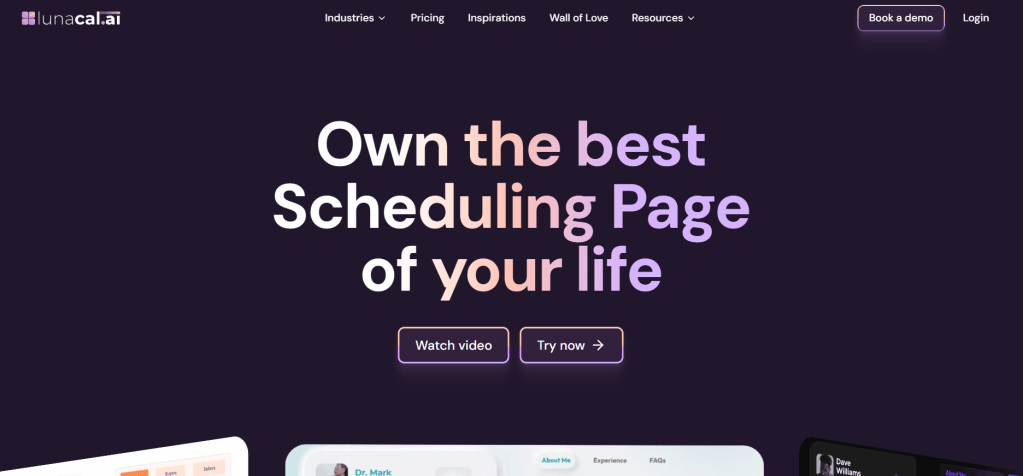
After setting up multiple scheduling systems, Lunacal feels less like a basic booking tool and more like a client-facing workflow engine. It’s widely recognized as one of the strongest tools in this space, backed by its 4.9/5 rating on Lunacal. Compared to standard calendar-link tools, it focuses heavily on branded experiences, automation, and structured booking flows.
Who Should Use This Tool
- Service businesses running paid or structured appointments like coaching, consulting, or clinics
- Teams that rely on round-robin or shared scheduling across members
- Businesses that want booking pages to act like conversion assets, not just utility links
- Operators managing recurring sessions, packages, or onboarding workflows
- Agencies handling client intake, qualification, and scheduling in one flow
Core Features
- Advanced Calendar Sync
Calendar syncing across Google, Outlook, and Apple worked smoothly in testing, with real-time availability updates. This is critical when multiple team members are involved. That said, while setting up multiple event types, duplication required manual effort. I later saw a G2 review pointing out the same gap, which matched my experience. Screenshot shared below. - Branded Booking Pages
This is where Lunacal clearly separates itself. Instead of sending a plain scheduling link, the booking page can include visuals, structured sections, and business context. A G2 reviewer noted that the booking flow feels professional and intuitive, and I agree, it directly improves client trust and conversions. - Custom Domain Setup
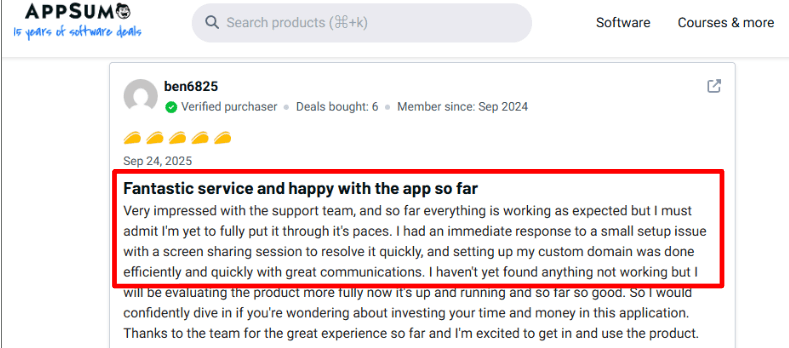
Setting up a custom domain was surprisingly straightforward. I also came across an AppSumo review mentioning fast human support during setup, which aligns with my experience. This matters because most tools treat booking pages as secondary, while Lunacal treats them as front-facing assets.
- Team Routing Logic
Round-robin and collective scheduling are flexible enough for real team workflows. Compared to simpler tools, routing rules feel more intentional, especially when assigning leads or balancing workloads across a team. - Payment Integration Flow
You can connect Stripe or PayPal to collect payments during booking. This is essential for consultants, educators, or clinics where confirmation depends on payment. Many general tools support payments, but Lunacal integrates it more naturally into the booking flow. - Workflow Automation System
Automated reminders, follow-ups, and pre-meeting flows reduce manual coordination. In practice, this replaces multiple disconnected tools and moves closer to a lightweight CRM-style setup.
Red Flags
- For niche setups like large clinics or multi-service businesses, duplicating similar appointment types takes longer than expected. This limitation has also been noted in user feedback on platforms like G2, underscoring its impact on real workflows.
- Initial configuration takes effort. Compared to simpler tools, setting up workflows and structured booking logic requires more upfront time.
Pricing
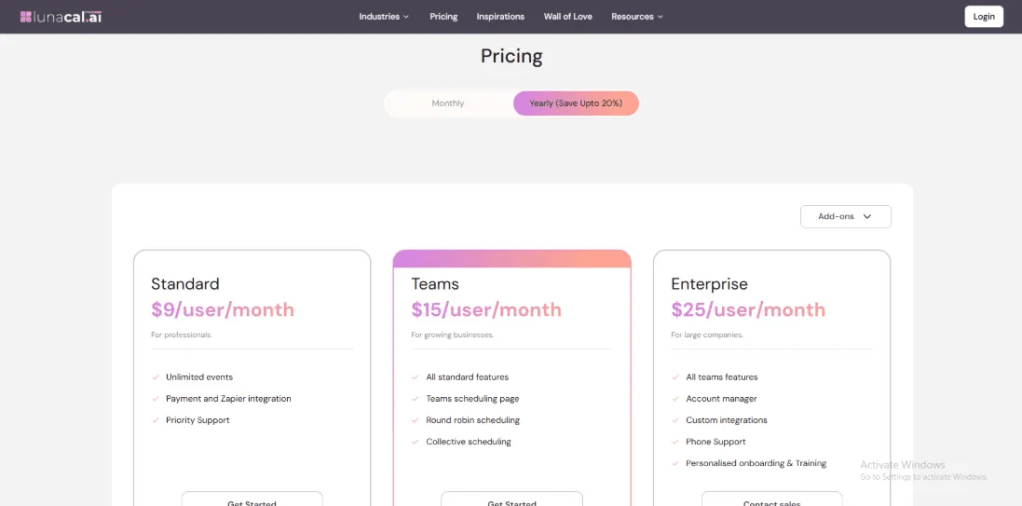
- Starts around $9/user/month for core scheduling features
- Team plans unlock routing, shared scheduling, and collaboration
- Higher tiers include advanced integrations and support
- Additional costs may apply for SMS and workflow automation
- Full breakdown available on the official pricing page
Calendly
Intro
Calendly is widely known as the go-to tool for simple, fast appointment scheduling. After setting it up, what stood out immediately was how quickly a clean booking link could replace long email threads. Compared to traditional back-and-forth scheduling or heavier tools, it feels lightweight and efficient. It works best when the goal is to eliminate friction rather than build complex workflows.
Who Should Use This Tool
- Solo professionals and consultants who need quick, shareable booking links without setup overhead
- Sales teams handling high volumes of meetings where speed matters more than customization
- Remote teams coordinating across time zones with minimal manual effort
- Businesses transitioning from manual scheduling into structured appointment systems
- Use cases where appointment scheduling software needs to stay simple and fast, without layered workflows
Core Features
- Calendar sync
Syncs with Google, Outlook, and Apple calendars. In practice, this prevents double bookings and keeps availability accurate across multiple tools. - Meeting integrations
Automatically connects with Zoom, Google Meet, and Teams. Every booking instantly generates a meeting link, which removes manual setup steps. - Availability rules
Lets you define working hours, buffers, and limits. This works well for controlling daily workload, though it’s less flexible than advanced tools. - Automated reminders
Sends email and SMS reminders to reduce no-shows. This is one area where it clearly outperforms manual scheduling methods. - Payment collection
Integrates with Stripe and PayPal for paid bookings. Useful for consultations, though not as robust as tools built for service packages.
Red Flags
- Service-based workflows like multi-session bookings or intake-heavy appointments can feel limited. This becomes clear when compared to more specialized tools, as noted in Calendly reviews on G2.
- Customization depth is restricted. Booking pages are clean but lack the branding flexibility many businesses expect.
- During setup, routing logic for teams felt slightly constrained when compared to more advanced scheduling systems.
Pricing
- Free plan available with basic scheduling features
- Paid plans start at $10/month (Standard) and scale with team features
- Higher tiers unlock workflows, integrations, and admin controls
- Pricing is transparent and easy to understand compared to many competitors
- Full details available on the official pricing page.
Acuity Scheduling
Intro
Acuity Scheduling is best known for handling service-based appointments where payments, packages, and client data all matter. When I set it up, it felt closer to a business operations tool than a simple scheduler. Compared to basic booking tools or manual systems, it gives much deeper control over how appointments are sold, managed, and repeated.
Who Should Use This Tool
- Service businesses like clinics, coaches, and salons that need payments tied to bookings
- Teams offering recurring sessions, memberships, or classes with structured scheduling
- Businesses replacing manual booking plus invoicing with one unified system
- Appointment-heavy workflows where intake forms and client tracking matter
- Use cases where appointment scheduling software must handle revenue, not just time slots
Core Features
- Client intake forms
Lets you collect detailed information before appointments. This is useful for consultations, therapy sessions, or onboarding calls where prep matters. - Payment integration
Supports Stripe, Square, and PayPal. In real use, clients can pay before confirming, which removes follow-up billing entirely. - Package management
Enables multi-session bundles, subscriptions, and memberships. This is especially useful for coaching or fitness businesses running repeat sessions. - Calendar integration
Syncs across major calendars and handles time zones well. This keeps schedules aligned across staff and clients without manual checks. - Automated workflows
Sends confirmations, reminders, and follow-ups. Compared to manual scheduling, this removes a huge amount of repetitive communication.
Red Flags
- Setup can feel complex at the start, especially when configuring reminders and workflows. Some users mention it becomes “convoluted” for non-technical teams on Acuity Scheduling reviews via G2.
- Reporting features are basic. For businesses needing deeper analytics or forecasting, this can feel limiting over time
- Integration depth is narrower than expected, especially for advanced API use cases
Pricing
- Emerging plan starts at $16/month for one staff/location
- Growing plan at $27/month adds packages, subscriptions, and SMS reminders
- Powerhouse plan at $49/month supports larger teams and advanced scaling
- Pricing reflects its positioning as a service-business tool rather than a lightweight scheduler
- Full pricing details: https://acuityscheduling.com/pricing
Setmore
Intro
Setmore is best known as a budget-friendly appointment scheduling tool with a surprisingly capable free plan. When I tested it, the biggest advantage was how quickly it gets a booking system live without much setup. Compared to manual scheduling or even some paid tools, it delivers a working system almost instantly, especially for small service businesses.
Who Should Use This Tool
- Solo professionals or small teams looking for a free or low-cost scheduling system
- Service-based businesses like tutors, salons, or consultants needing simple booking + reminders
- Businesses moving from manual scheduling to automated appointment flows
- Teams that want basic appointment scheduling software without heavy customization
- Early-stage setups where cost matters more than advanced workflow automation
Core Features
- Online booking page
Comes with a customizable public booking page. In practice, this replaces the need for a website early on and lets clients book directly. - Calendar integration
Syncs with Google and Outlook calendars. This helps avoid double bookings, though it’s not as robust as higher-end tools. - Automated reminders
Sends email and SMS reminders even on the free plan. This significantly reduces missed appointments in day-to-day use. - Payment collection
Supports Stripe and Square for paid bookings. Useful for basic consultations, though not built for complex pricing models. - Multi-staff scheduling
Allows teams to manage multiple staff calendars. This works well for small teams but lacks advanced routing logic.
Red Flags
- Service-specific scheduling can feel restrictive. For example, setting different services on specific days is limited, as highlighted in Setmore G2 reviews. This becomes a blocker for clinics or structured service businesses.
- Calendar sync reliability can require manual fixes at times. Some users report needing to reconnect Google Calendar, which interrupts scheduling flow
- Compared to more advanced tools, integrations and automation feel basic, especially as business needs grow
Pricing
- Free plan available for up to 4 users, which is unusually generous
- Paid plans start at $5/user/month with added features and support
- Includes booking page, reminders, and payments even at lower tiers
- Positioned as one of the most affordable tools in this category
- Full pricing details: https://www.setmore.com/pricing
Zoho Bookings
Intro
Zoho Bookings is best known for fitting seamlessly into the broader Zoho ecosystem while keeping scheduling affordable and flexible. When I set it up, it felt more like a connected business tool than a standalone scheduler. Compared to basic scheduling tools or manual booking systems, it works best when scheduling is tied to CRM, sales, or internal workflows.
Who Should Use This Tool
- Businesses already using Zoho CRM or Zoho One and want everything connected
- Small teams needing affordable appointment scheduling software with decent automation
- Sales or support teams managing demos, consultations, or client bookings
- Companies moving from spreadsheets or manual scheduling into structured systems
- Use cases where scheduling needs to connect with CRM, reporting, or internal tools
Core Features
- Calendar integration
Syncs with Google, Outlook, and Zoho calendars. In practice, this keeps availability aligned across teams, though it depends on proper setup. - Custom booking pages
Lets you create branded booking pages with basic customization. Works well for client-facing bookings without needing a full website. - Team scheduling tools
Supports collective bookings and shared calendars. This helps teams coordinate demos or consultations more efficiently. - Payment integration
Connects with Stripe and other gateways for paid appointments. Useful for monetized scheduling, though not deeply flexible for complex pricing. - Workflow automation
Handles reminders, confirmations, and notifications. This reduces manual follow-ups and replaces repetitive admin work.
Red Flags
- Integration outside the Zoho ecosystem can feel limiting. Many users report friction when connecting external tools, especially compared to more open platforms
- Availability syncing can behave inconsistently with Google Calendar in some setups, which can affect booking accuracy
- During setup, routing logic and advanced workflows felt less intuitive than tools designed specifically for scheduling
Pricing
- Free plan available for individuals with basic scheduling
- Paid plans start at $6/user/month (Basic) and $9/user/month (Premium)
- Higher tiers unlock payments, workflows, and multi-workspace setups
- Pricing is highly competitive compared to most scheduling tools
- Full pricing details: https://www.zoho.com/bookings/pricing.html
Conclusion
If the goal is fast, reliable scheduling with minimal setup, start with Calendly. If the workflow involves payments, repeat sessions, or deeper service logic, tools like Acuity Scheduling or Lunacal make more sense from day one. After testing these in real scenarios, the difference shows up quickly in how much manual work they eliminate.
- Calendly works best for solo professionals and sales teams needing quick booking links and clean scheduling flows.
- Acuity Scheduling fits service businesses like clinics or coaches that rely on payments, packages, and client data.
- Lunacal stands out for teams needing branded booking pages, automation, and more advanced scheduling control.
- Setmore is a strong pick for small teams or startups that want a free or low-cost system running quickly.
- Zoho Bookings makes the most sense for businesses already using Zoho tools and needing CRM-connected scheduling.
FAQs
1. What is the best appointment scheduling software for small businesses?
Tools like Calendly and Setmore are popular for small businesses due to ease of use and low cost. They help automate bookings, reminders, and basic scheduling without complex setup.
2. Which scheduling tool is best for paid appointments?
Acuity Scheduling and Lunacal are strong choices since they support payments, packages, and service-based pricing models directly within the booking flow.
3. How do scheduling tools reduce no-shows?
Most tools send automated email and SMS reminders, along with easy rescheduling links. This reduces missed appointments significantly compared to manual scheduling.
4. Can appointment scheduling software handle team bookings?
Yes, tools like Calendly, Lunacal, and Zoho Bookings offer team scheduling, round-robin assignments, and shared availability features.
5. What features matter most in scheduling software?
Key features include calendar sync, automated reminders, payment integration, booking page customization, and team scheduling capabilities.
6. Is free scheduling software enough for growing businesses?
Free tools work well initially, but growing businesses often need paid features like automation, integrations, and advanced scheduling logic.
7. How do I choose the right scheduling tool quickly?
Focus on your workflow: choose simple tools for basic booking, or advanced platforms if you need payments, automation, or team coordination.
 OnlineSchedulingTools
Leave a comment