Key Summary
These are the fastest ways to shortlist the right booking software for consultants before going deeper:
- Lunacal for consultants, coaches, and advisory teams that want a branded booking page, payments, intake questions, and team scheduling in one place. (Lunacal)
- Calendly for consultants who want fast, reliable scheduling with minimal setup and familiar workflows. (Calendly.com)
- Acuity Scheduling for consultants selling packages, paid sessions, or structured services with deposits and subscriptions. (Acuity Scheduling)
- Cal.com for technical consultants or product-led teams that need APIs, routing logic, and deeper control over scheduling workflows. (Cal.com)
- YouCanBookMe for solo consultants and freelancers who want a simple booking page with solid calendar sync and basic customization. (YouCanBookMe)
Introduction
I usually start looking for booking software for consultants when scheduling stops being just coordination and starts affecting conversion, intake, or revenue. Most default tools handle basic availability well, but they fall short when you need branded booking pages, payments, or structured client onboarding.
I reviewed Lunacal, Calendly, Acuity Scheduling, Cal.com, and YouCanBookMe by going through their product docs, pricing pages, and real user feedback. I also cross-checked G2 and similar platforms to validate what actually works beyond marketing claims. The main things I focused on were booking flow quality, intake handling, payments, team scheduling, and how much manual work each tool removes.
If you want the short answer, these are the five tools I would shortlist first. Lunacal stands out when the booking page itself needs to do more work, especially for consultants who rely on inbound leads and paid sessions.
Booking Software for Consultants: Feature Comparison
This table helps you compare the shortlist quickly based on what actually matters for consulting workflows.
| Feature | Lunacal | Calendly | Acuity Scheduling | Cal.com | YouCanBookMe |
| G2 Rating | 4.9 ★★★★★ | 4.7 ★★★★☆ | 4.6 ★★★★☆ | 4.6 ★★★★☆ | 4.7 ★★★★☆ |
| Starting Price | $9 | $10 | $16 | $12 | $7.20 |
| Calendar Sync | Google, Outlook, Apple | Partial | Google, Outlook | Yes | Yes |
| Reminders | Email + SMS | Email + SMS | Email + SMS | Email + SMS | Email + SMS |
| Paid Bookings | Yes (Stripe, PayPal) | Yes | Yes (Stripe, Square) | Yes | Yes (Stripe) |
| Booking Page Customization | High | Limited | Medium | Medium | Medium |
| Team Scheduling | Yes | Yes | Yes | Yes | Yes |
| Round Robin | Yes | Yes | No | Yes | Yes |
| Packages / Multi-session | Yes | Limited | Yes | No | No |
| Custom Domain | Yes | No | Partial | Partial | No |
| GDPR Support | Yes | Yes | Yes | Yes | Yes |
What to Look for in Booking Software for Consultants
- Booking flow quality: The booking experience should feel simple for clients. If it takes too many steps, you will lose conversions before the call even happens.
- Calendar reliability: Ensure the tool blocks conflicts properly and syncs across all the calendars you use. This is what prevents double bookings and scheduling chaos.
- Client intake and context: Consulting calls often need prep. Tools that allow intake questions or context collection reduce back-and-forth before meetings.
- Payments and packages: If you sell consultations, deposits, or packages, built-in payments save time and reduce no-shows.
- Team scheduling and routing: If you work with multiple consultants or partners, routing and round-robin features help automatically distribute bookings.
- Booking page experience: This matters more than most people expect. A clear, branded booking page builds trust and improves conversion, especially for high-value consulting sessions.
Lunacal
Intro
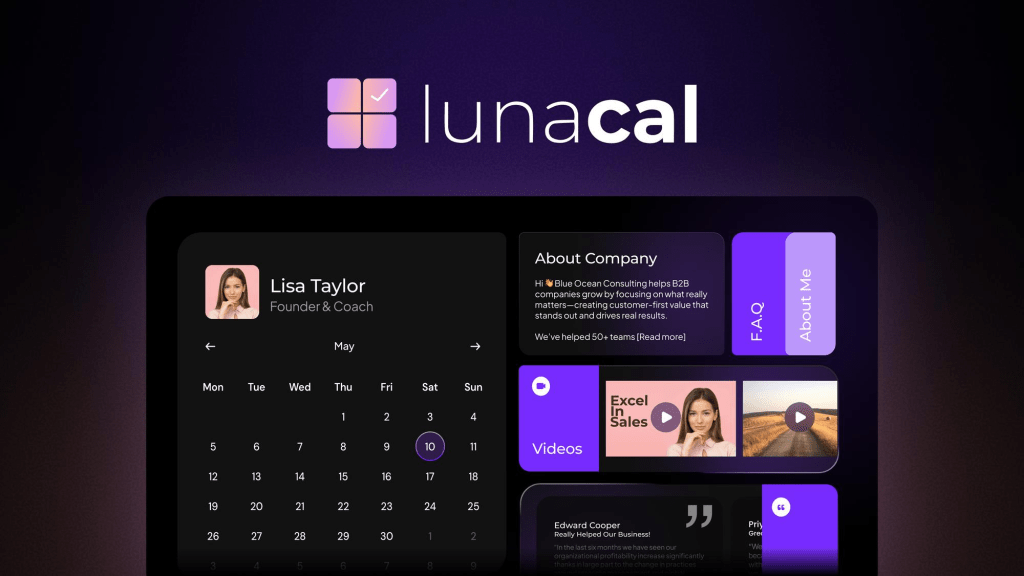
Lunacal is best known for turning a booking page into a full client-facing experience rather than just a time-slot picker. When I tested it for consulting workflows, it felt closer to a lightweight conversion page than a standard scheduler. Compared to typical booking software consultants use, it works better when your booking link needs to explain services, qualify clients, and capture payments in one place.
Who Should Use This Tool
- Independent booking software consultants offering audits, strategy calls, or paid sessions
- Agencies and consulting firms managing inbound leads through booking links
- Coaches, advisors, and service consultants who rely on pre-call context and intake
- Small consulting teams that need routing, shared availability, and branded booking pages
- Less suitable for consultants working inside rigid enterprise scheduling systems like Microsoft 365
Features
Booking page builder
This is the main reason I would recommend Lunacal for booking software consultants. You can add service descriptions, testimonials, videos, FAQs, and custom sections next to the calendar. Compared to standard scheduling tools, this reduces drop-offs because clients understand what they are booking before selecting a time. This lines up with patterns seen in G2 reviews of Lunacal where users consistently mention clearer booking flows and better client understanding.
Availability controls
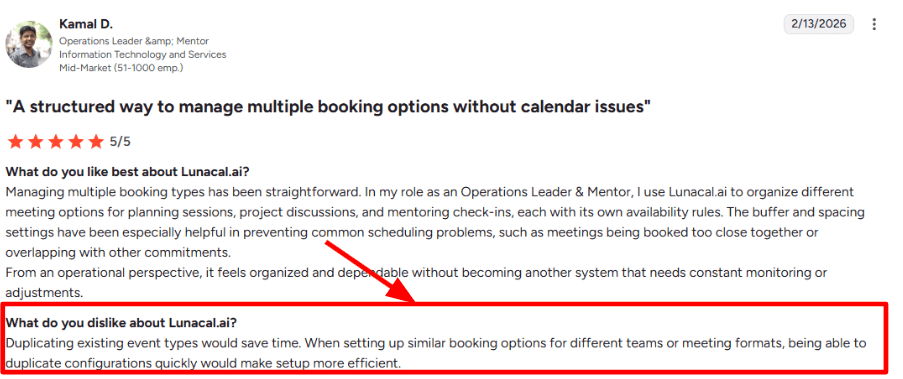
Lunacal lets you define buffers, notice periods, approval rules, and custom availability across different services. I used this to separate discovery calls from paid consulting sessions. One part that slowed me down was creating similar event types repeatedly.
Calendar integration
It syncs with Google, Outlook, and Apple calendars, which is useful if you work across clients in different ecosystems. Compared to Microsoft Bookings, which is tightly tied to Outlook, Lunacal feels more flexible for consultants working across multiple tools and time zones.
Payment integration
Lunacal supports Stripe and PayPal for paid bookings, along with discounts and session packages. This is important for booking software consultants who charge upfront for advisory calls or structured consulting sessions. Unlike traditional workflows, you do not need to send invoices separately after scheduling.
Team scheduling
For consulting teams, Lunacal supports round robin, collective scheduling, and shared booking pages. This makes it easier to distribute leads across consultants without manual coordination. One detail that stood out is its strong rating footprint on G2 (around 4.9 with dozens of reviews), which usually signals consistent product delivery at this stage.
Red Flags
- If your consulting workflow depends on deep CRM pipelines or enterprise scheduling systems, Lunacal may not fit well. Feedback patterns on G2 reviews reflect this gap
- Creating multiple similar service types takes more manual effort than expected, especially for consultants offering tiered packages
- Some advanced features like team routing and integrations, are only available in higher-tier plans
Pricing
- Standard starts at $9 per user/month and includes core scheduling, payments, and integrations
- Teams plan at $15 per user/month adds round robin and shared scheduling
- Enterprise plan at $25 per user/month includes onboarding, custom integrations, and advanced features
- Annual billing can reduce overall cost depending on usage
- Full pricing details: https://lunacal.ai/pricing
Calendly
Intro
Calendly is known for fast, no-friction scheduling that works across industries. When I tested it, setup took minutes and sharing links was effortless. Compared to tools like Lunacal, it focuses less on branding and more on reliability and speed, which makes it a strong fit for booking software consultants who just need meetings to get scheduled without extra setup overhead.
Who Should Use This Tool
- Consultants running simple 1:1 calls or discovery sessions
- Sales teams scheduling demos and client meetings
- Recruiters handling screening interviews
- Teams that need quick adoption across multiple users
- Not ideal for consultants who need branded booking pages or complex intake flows
Core Features
Calendar integration
Google and Outlook sync works smoothly and is one of Calendly’s strongest areas. Time zone handling is reliable, which matters for consultants working with clients globally. This is consistently reflected in Calendly G2 reviews, where users highlight ease of syncing and dependability across calendars.
Scheduling workflows
Automated reminders and follow-ups help reduce no-shows. I had to spend a bit of time adjusting triggers during setup, but once configured, it runs reliably. This aligns with patterns seen in G2 pros and cons feedback, where users mention strong automation but some initial setup friction.
Availability controls
Buffers, daily limits, and event-specific rules are easy to configure. I used this to separate short intro calls from longer sessions without overcomplicating things. Compared to heavier tools, this balance between control and simplicity is where Calendly performs well.
Routing logic
Round robin and routing forms allow teams to distribute meetings automatically. For consulting teams handling inbound leads, this is a step above basic schedulers. It works best when routing rules are clearly defined upfront.
Payment support
Calendly supports Stripe and PayPal for paid bookings. This works well for simple paid consultations. However, compared to tools like Acuity, it does not go as deep into packages or subscriptions.
Red Flags
- Limited booking page customization compared to tools like Lunacal
- Costs increase quickly once you need routing, team features, or automation at scale
- Not built for complex multi-step workflows or detailed intake processes, which is also reflected across G2 reviews.
Pricing
- Free plan available
- Standard: $10 per user/month
- Teams: $16 per user/month
- Enterprise: custom pricing
- Full pricing details: https://calendly.com/pricing
Acuity Scheduling
Intro
Acuity Scheduling is built for appointment-based businesses that need payments, packages, and structured booking flows. When I tested it for consulting-style setups, it felt closer to a service operations tool than a basic scheduler. Compared to general tools like Calendly, it handles paid sessions, structured services, and client workflows much more effectively.
Who Should Use This Tool
- Consultants selling packages, retainers, or multi-session services
- Coaches, wellness providers, and educators with structured offerings
- Businesses that need deposits, subscriptions, or prepaid bookings
- Teams managing different service types with specific rules
- Not ideal for consultants who only need simple 1:1 scheduling
Core Features
Service configuration
Each service can have its own pricing, duration, and booking rules. I used this to create different consulting tiers with separate pricing and time slots. This flexibility is often highlighted in Acuity Scheduling G2 reviews, where users mention how customizable appointment types are compared to simpler schedulers.
Client intake forms
You can collect detailed information before booking, which is useful for prep-heavy consulting workflows. I found this helpful for gathering context before calls, though shaping forms cleanly took some trial and error. This matches feedback seen in G2 pros and cons, where users mention flexibility but also some setup friction.
Payment system
Acuity supports Stripe, Square, and PayPal with options for deposits, subscriptions, and packages. This is one of the strongest reasons to choose it over general scheduling tools. It allows the booking flow to double as a checkout process, which reduces admin work significantly.
Calendar sync
It syncs with Google, Outlook, and iCloud calendars. When I tested it, calendar blocking worked well, but availability still needs to be managed inside Acuity itself. This is a small shift if you are used to tools that rely fully on external calendars.
Meeting integrations
Zoom and Google Meet links are automatically generated per booking. This works smoothly for both one-on-one sessions and group appointments, especially for remote consulting workflows.
Red Flags
- Setup becomes more complex as you add services, forms, and rules, which is also reflected in broader G2 reviews
- Key features like SMS reminders, packages, and subscriptions are locked behind higher-tier plans
- Not ideal if you only need basic scheduling, as the system can feel heavier than necessary
Pricing
- Starter: $16/month
- Standard: $27/month
- Premium: $49/month
- Enterprise: custom pricing
- Full pricing details: https://acuityscheduling.com/pricing
Cal.com
Intro
Cal.com is known for being open-source and highly customizable. When I tested it in a consulting-style setup, it felt more like scheduling infrastructure than a ready-to-use tool. Compared to standard schedulers like Calendly, it gives significantly more control over workflows, routing, and integrations, but requires more setup effort to get everything working smoothly.
Who Should Use This Tool
- Technical consultants who need APIs and workflow customization
- SaaS teams embedding scheduling into their product
- Startups building custom booking or routing systems
- Privacy-focused businesses needing hosting and compliance control
- Not ideal for non-technical consultants or quick setup use cases
Core Features
Calendar integration
Cal.com supports a wide range of integrations across Google, Outlook, and other tools. When I tested it, syncing worked well once everything was connected. This flexibility is often highlighted in Cal.com G2 reviews, where users mention its ability to work across multiple ecosystems rather than being tied to one stack.
Open API system
This is where Cal.com really stands out. Full API access allows deep customization, from embedding booking flows to building completely custom scheduling experiences. Compared to traditional tools, this opens up use cases that go beyond simple meeting booking.
Routing forms
Routing forms help qualify leads before scheduling and direct them to the right event or team member. I found this particularly useful for consulting workflows where not every lead should go to the same calendar. This adds a layer of logic missing in most basic schedulers.
Team scheduling logic
Round robin and collective scheduling are built into the system. Once configured, it handles team distribution well. However, I did have to spend extra time understanding how team-level and event-level rules interact, which matches feedback seen in G2 pros and cons.
Payments and compliance
Cal.com supports Stripe and PayPal for paid bookings and includes compliance options like GDPR and HIPAA on higher tiers. This makes it suitable for consultants working in regulated industries or handling sensitive client data.
Red Flags
- Setup takes longer than most scheduling tools, especially when configuring routing and integrations
- Requires technical understanding to unlock full value, which is also reflected in broader G2 reviews
- Pricing increases as you move into team features and advanced configurations
Pricing
- Free plan available for individual use
- Teams: $12 per user/month
- Organizations: $28 per user/month
- Enterprise: custom pricing
- Full pricing details: https://cal.com/pricing
YouCanBookMe
Intro
YouCanBookMe focuses on simplicity with more customization than basic schedulers. When I tested it for consulting workflows, it felt like a practical middle ground between Calendly and more configurable tools. Compared to Microsoft Bookings, it gives better control over how the booking page looks and how availability is managed, without adding too much operational complexity.
Who Should Use This Tool
- Solo consultants and freelancers managing their own bookings
- Small teams working across mixed calendar systems
- Coaches, advisors, and service providers offering paid sessions
- Businesses that want simple, client-facing booking links with some customization
- Not ideal for complex workflows, multi-step processes, or recurring booking systems
Core Features
Booking page control
YouCanBookMe gives more flexibility than basic schedulers when it comes to branding and layout. You can customise booking pages, add instructions, and control how slots appear. Compared to tools like Microsoft Bookings, this makes the page feel more client-ready rather than just functional. This is also reflected in YouCanBookMe G2 reviews, where users highlight ease of customisation.
Availability rules
Scheduling logic is flexible, with options for repeating hours or calendar-based availability. I found this useful when managing different consulting time slots. One small friction point was figuring out which controls were available on which plan, which aligns with feedback seen in G2 pros and cons.
Calendar integration
It supports Google, Microsoft, and Apple calendars with conflict checking across them. This is helpful for consultants working across different client ecosystems. Compared to Microsoft Bookings, it is less tied to a single platform.
Red Flags
- Limited support for recurring or bundled bookings, which can be restrictive for consultants offering packages
- Some useful features are locked behind paid plans, as noted across G2 reviews
- Not ideal for complex workflows or multi-step scheduling processes
Pricing
- Free plan available
- Individual: $9/month
- Professional: $13/month
- Teams: $18 per user/month
- Full pricing details: https://youcanbook.me/pricing
Conclusion
If you want the short answer, most businesses switching booking software are trying to solve one of four problems: better booking experience, payments and packages, team scheduling, or flexibility outside a single ecosystem.
- Lunacal is the strongest pick when your booking page needs to convert, not just schedule. It works best for consultants, coaches, and service teams where context, branding, and payments matter.
- Calendly is still the easiest option for simple scheduling. If speed, familiarity, and reliability are your priorities, it’s hard to beat.
- Acuity Scheduling fits appointment-heavy businesses that sell sessions, packages, or subscriptions and need more control over how bookings are structured.
- Cal.com is the right choice when scheduling becomes infrastructure. If you need APIs, routing logic, or customization, it goes further than most tools.
- YouCanBookMe is a practical middle ground for solo operators and small teams that want flexibility without a heavy setup.
The reason this category matters more now is simple: the market itself is growing quickly, with appointment scheduling software expected to jump from $546.1M in 2025 to $635.6M in 2026, driven by demand for better customer experience and automation. That shift is exactly why basic booking links are no longer enough for many businesses.
FAQs
What is the best booking software for consultants?
For most consultants, Lunacal is the better choice because the booking page doubles as a client-facing experience. It helps explain services, collect intake, and accept payments in one flow. Calendly works if you only need a simple scheduling link.
Which tool is easiest to set up?
Calendly is the fastest to launch. You can create a working booking link in minutes with minimal configuration. Tools like Acuity or Cal.com take longer because they offer more control.
Which booking software supports payments?
Lunacal, Calendly, Acuity Scheduling, Cal.com, and YouCanBookMe all support payments, typically through Stripe or PayPal. Acuity goes deeper with packages, subscriptions, and deposits.
What is the best option for teams?
Calendly and Lunacal are the easiest for team scheduling with round robin and shared availability. Cal.com is better for teams that need routing logic or custom workflows.
Which tool is best for service businesses?
Acuity Scheduling is usually the best fit for service businesses selling appointments, packages, or memberships. Lunacal is a strong alternative if booking experience and branding are more important than operational depth.
Is there a free booking software option?
Yes. Calendly, Cal.com, and YouCanBookMe offer free plans with basic scheduling features. Paid plans unlock team features, payments, and advanced controls.
When should you switch booking software?
Switch when the current tool starts limiting booking conversion, payments, or team workflows. Common signs include too many manual steps, weak booking pages, or missing features like packages and routing.
What should I test before switching?
Focus on:
- Booking flow (how easy it is for clients to book)
- Calendar sync reliability
- Payments and packages
- Team scheduling workflows
- Reminder and notification quality
These are the areas that impact daily operations the most after switching.
 OnlineSchedulingTools