
TL;DR
If your current fitness class scheduling software still creates extra admin after someone books, I would look at Lunacal first. For this category, I care most about class booking flow, packs and memberships, reminders, payments, team scheduling, and how much manual cleanup the tool leaves for staff. Lunacal stands out for growing studios that want a cleaner booking page and strong day-to-day class operations, while Mindbody, WellnessLiving, Vagaro, and Zen Planner are the main popular alternatives worth shortlisting. (Lunacal)
Best fitness class software
The fitness and wellness software market was valued at $81.9 billion in 2024 and is projected to reach $133.7 billion by 2030. That tells me studio owners now expect more from scheduling software than a basic class calendar. (GlobeNewswire)
For this guide, I went through official product pages, pricing, documentation, and review patterns because fitness businesses run into very specific problems once class packs, memberships, waitlists, instructors, and late cancellations enter the picture. If your current tool still makes staff fix bookings by hand, chase payments, or explain credits over chat, that is a real reason to switch. The main alternatives I would look at are Lunacal, Mindbody, WellnessLiving, Vagaro, and Zen Planner. I compared them on class scheduling, reminders, payments, package support, team workflows, and how well each tool fits solo studios, growing teams, and multi-location setups. I also cross-checked claims where needed against review sources like G2 and Capterra, along with official pricing and help pages. In the sections ahead, I’ll help you see which tool fits you fastest and where each one starts to feel heavy, limited, or expensive. (Lunacal)
Quick picks by studio type
These are the fastest picks if you want to narrow the list without reading every tool profile.
- Lunacal works best for independent studios and growing fitness businesses that want branded booking pages, class packs, memberships, SMS reminders, payments, and scheduling across coaches or locations. (Lunacal)
- Mindbody fits established studios and larger fitness businesses that want a broad platform with class scheduling, staff tools, reporting, payments, and marketplace reach. (Mindbody)
- WellnessLiving is a strong fit for gyms, yoga studios, and multi-location setups that need recurring classes, waitlists, client app access, memberships, and central operations. (WellnessLiving)
- Vagaro fits small to mid-sized fitness businesses that want class scheduling, reminders, payments, and a tool that is widely used across wellness and fitness. (vagaro.com)
- Zen Planner is a good fit for gyms, martial arts schools, and member-heavy businesses that need class scheduling, memberships, billing, and day-to-day gym operations in one system. (Zen Planner)
Feature table
I used the current G2 review pages for ratings and then checked official pricing, help docs, and product pages for the feature calls. I marked a cell as Partial when I could verify only part of the exact feature set you listed. (G2)
| Feature | Lunacal | Mindbody | WellnessLiving | Vagaro | Zen Planner |
| Rating on G2 (out of 5) | 4.9 ★★★★★ | 3.7 ★★★☆☆ | 4.6 ★★★★☆ | 4.6 ★★★★☆ | 4.3 ★★★★☆ |
| Starting Price of Paid Plans (USD) | $9 | $99 | $69 | $23.99 | $99 |
| Calendar Sync: Google, Outlook, Apple | Yes | Partial | Partial | Partial | Partial |
| SMS/Email Reminders | Yes | Yes | Yes | Yes | Yes |
| Paid meetings | Yes (Stripe, PayPal) | Yes | Yes | Yes | Yes |
| Scheduling page Themes | Yes | Partial | Partial | Partial | Partial |
| Team Scheduling | Yes | Yes | Yes | Yes | Yes |
| Round Robin Scheduling | Yes | No | No | No | Partial |
| Multi-session Packages | Yes | Yes | Yes | Yes | Yes |
| Custom domain | Yes | Partial | Partial | Yes | Partial |
| GDPR | Yes | Yes | Yes | Yes | Yes |
Lunacal is the cleanest row in this table. G2 shows it at 4.9, paid plans start at $9 per user, and the official product pages list Google, Outlook, and Apple calendar sync, SMS and email reminders, Stripe and PayPal payments, custom domains, team scheduling, round robin, packages, and GDPR support. (G2)
Mindbody is the row where I kept the most caution. G2 shows 3.7 and official pricing starts at $99 per month per location. G2 features list Google, Outlook, and iCloud calendar integration, but Mindbody’s help docs say Outlook integration works only after Google Calendar is connected, so I marked calendar sync as Partial. I also kept themes and custom domain as Partial because I found branded widgets and widget customization, but not a clean standalone booking-page domain claim. Mindbody does have reminders, integrated payments, packages, staff scheduling, and GDPR documentation. (G2)
WellnessLiving currently shows 4.6 on G2, and its current starter plan is listed at $69. Official pricing and product pages clearly show email and SMS notifications, payments, staff support, branded website options, and memberships or passes. I marked calendar sync as Partial because I found Google sync evidence and an official Outlook integration release note, but I did not find a clean Apple sync source. I also kept custom domain and themes as Partial because I found a custom branded website offer, though not a clean booking-page domain setup source. WellnessLiving also publicly claims GDPR compliance. (G2)
Vagaro shows 4.6 on G2 and starts at $23.99. Its product pages and G2 profile clearly support reminders, payments, team usage, and packages or memberships. I marked calendar sync as Partial because Vagaro now supports Google Calendar sync, while old Outlook or Apple connections only continue if they were already connected before. I marked custom domain as Yes because Vagaro MySite supports connecting your own domain. GDPR support is also documented in its privacy and GDPR help pages. (G2)
Zen Planner shows 4.3 on G2, and G2 pricing starts at $99 per month. Its official pages clearly support memberships, class packages, payments, staff management, and email and SMS communication. I marked calendar sync, round robin, and custom domain as Partial because those capabilities show up through iCalendar links and Zen Planner Engage docs rather than as a simple base-plan scheduling-page feature. Zen Planner’s pricing FAQ also states that it is PCI and GDPR compliant. (G2)
What I check in scheduling software
When I think about moving to a new fitness class scheduling software, I do not start with a long feature checklist. I start with the problems I deal with every week in the studio. That keeps the decision grounded and helps me pick a tool that works in daily use, not just in a demo.
- I check the full booking flow from first click to confirmed class. I want to know how easy it is for someone to find a class, pick a slot, pay, and get a confirmation. If the flow feels confusing on mobile, I treat that as a real problem. A lot of people book from their phone, often in a hurry.
- I look closely at calendar sync and availability rules. This matters more once I have multiple instructors, recurring classes, private sessions, or a second location. I check whether the tool syncs with Google, Outlook, and Apple calendars, whether it blocks conflicts properly, and whether I can add buffers, cut-off times, and class capacity rules without doing manual work later.
- I check how payments work in real class businesses. I want to see if I can take full payments, deposits, memberships, class packs, intro offers, and renewals. I also look at refunds, failed payments, and what happens when someone reschedules after paying. If I need to explain credits to customers one by one, the tool is going to create support work for my team.
- I pay attention to reminders and the rescheduling flow. This is where many tools start to matter. I check whether the software sends email and SMS reminders, whether I can set timing rules, and whether clients can reschedule on their own without calling or messaging us. A smooth rescheduling flow saves a lot of back and forth, especially for early morning classes, weekend sessions, and busy instructors.
- I look at the booking page like it is part of the customer experience. For fitness businesses, people often want a little confidence before they book. I check whether I can show class details, trainer info, policies, package options, location details, and branding in a clean way. A plain booking page can still work, though it may leave people with questions that slow down bookings.
- I check team scheduling and routing once the business is bigger than one person. If I run classes with several coaches, I want to see how the tool handles team calendars, shared availability, staff permissions, and location-based scheduling. If I also offer trials, consult calls, or onboarding chats, routing becomes important too. I want the right lead or booking to land with the right coach without manual sorting.
- I make sure the tool handles classes, packages, and memberships properly. This is one of the first things I check for fitness businesses because it affects revenue and client experience every day. I look for pack tracking, usage limits, expiry rules, recurring plans, and waitlists. If the system is better at one-off appointments than recurring fitness workflows, I want to know that early.
- I check reporting with simple questions in mind. I want to know which classes fill fastest, where no-shows happen, which instructors stay busiest, how many credits are unused, and what revenue comes from memberships versus drop-ins. I do not need a huge reporting layer on day one, though I do need enough visibility to spot operational issues before they grow.
- I think about migration before I get excited about new features. This is where many switches become painful. I check whether I can import clients, memberships, credits, packages, staff schedules, and upcoming bookings without losing track of people. I also look at how long it will take to rebuild forms, reminder templates, payment setup, and booking links.
- I also check the small things that turn into daily friction. That includes custom domain support, mobile admin access, staff roles, waivers, integrations, taxes, refunds, and how responsive support is when setup gets messy. These are easy to ignore in the buying stage. They matter a lot once the studio is live and classes are already running.
In the end, I try to picture a normal week. New bookings. Reschedules. A full class. A no-show. A coach calling in sick. A client asking where their pack credit went. The right tool should make those moments easier to manage. That is usually how I know I am looking at a good fit.
Fitness schedulers worth a closer look
This is the section where I’d go tool by tool. I’d keep it practical and show who each product fits, which parts hold up in real studio use, and where the setup, pricing, or workflow starts to feel limiting.
Lunacal
If your current booking flow is doing little more than showing time slots, Lunacal is worth a serious look. It is best known for turning the booking page into something more complete, with space for context, payments, reminders, and team logic. In my testing, I would look at it over a typical fitness class scheduling software setup when the session still needs some selling before the person books, especially for trainers, coaches, yoga teachers, pilates instructors, and smaller studios.
Who should use this tool
This makes the most sense when the booking page needs to help with both conversion and coordination.
1. If you run premium coaching, intro assessments, paid consultations, or small-group programs, Lunacal fits well. I found it useful when the page needed to explain the offer before booking, which is something a typical fitness class scheduling software flow often leaves thin.
2. I would shortlist it for independent trainers, yoga teachers, pilates coaches, dance instructors, rehab-focused fitness businesses, and gym owners who mix 1:1 sessions with small classes. That mix is where its pages, questions, and payment flow feel practical.
3. It also works for smaller fitness teams with a few coaches or locations. The Teams plan includes round robin, collective scheduling, and separate team pages, so it can handle shared lead flow without getting too heavy.
4. If you sell through content and trust, this is a better fit than a plain class-first booking flow. I could add trainer context, testimonials, files, and FAQs on the page, which helps when a prospect is still deciding whether to join.
5. I would keep it off the shortlist for bigger studios that live inside recurring memberships, dense class timetables, waitlists, and front-desk operations all day. My read is that Lunacal fits booking-led fitness businesses better than full studio-management setups.
Features
What stood out to me was not one big feature. It was how the small parts of the booking flow worked together.
1. Booking pages
This is the main reason to look at Lunacal. You can add videos, testimonials, documents, custom questions, themes, and a custom domain, so the page can do more than show a calendar. I also noticed the [Microsoft marketplace listing](https://marketplace.microsoft.com/ro-ro/product/web-apps/lunacalprivatelimited1740581377690.lunacal-ai?tab=overview) positions it as an online class booking product, which lines up with how I saw it fit smaller fitness businesses.
2. Event setup
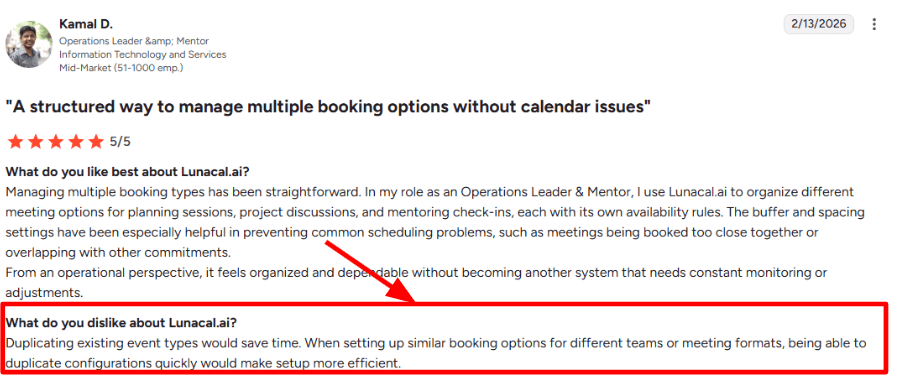
Setting up different booking types for trials, paid consultations, coach calls, or class inquiries felt straightforward, and custom questions help qualify people before they land on your calendar. One part took more time than I wanted though. When I built similar event types, I missed a quick duplicate option, and I saw the same point in this [G2 review](https://www.g2.com/products/lunacal-ai/reviews). The screenshot you are adding below will make that easier to show.
3. Reschedule flow
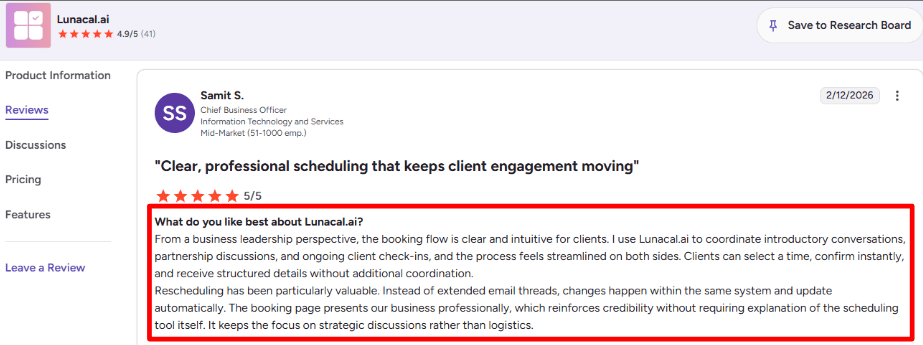
This part felt solid in testing. Clients can change timing inside the same system, and the update carries through without extra email cleanup. That matches this [G2 review](https://www.g2.com/products/lunacal-ai/reviews), where the reviewer said the booking flow is clear for clients and rescheduling keeps things moving without long threads. Your screenshot below supports that point well.
4. Calendar sync
Lunacal connects with Google, Outlook, and Apple calendars, and it supports buffers, notice periods, timezone detection, and availability exceptions. I liked that I could shape availability by event type instead of relying on one generic weekly calendar, which matters when fitness businesses run intro calls, classes, and follow-ups side by side.
5. Payment integration
Payments are built in through Stripe and PayPal, and Lunacal’s public pricing page also says paid bookings carry 0 percent commission. That makes it a clean fit for paid consultations, trial sessions, workshops, or coach-led assessments where you want payment handled before the booking is confirmed.
Red flags
There is a lot here for the right setup, though I would still be careful in a few cases.
– If you need class capacity control, waitlists, memberships, attendance tracking, or a front-desk workflow, I would not pick Lunacal over a true fitness class scheduling software. Its public feature set leans toward [group bookings, payments, booking-page customization, and team scheduling](https://lunacal.ai/pricing), which is useful, though it is not the same thing as a studio operating system.
– Managing many similar event types can take extra clicks. I felt that while testing, and the same issue shows up in this [G2 review](https://www.g2.com/products/lunacal-ai/reviews) about duplicating event types for similar booking setups.
– Per-user pricing is easy to follow, though it can add up faster for larger instructor rosters. I would map seat count early if your fitness business has many coaches, admins, or separate booking pages.
Pricing
Pricing is simple enough to model before you commit.
– The [official pricing page](https://lunacal.ai/pricing) starts at $9 per user per month for Standard, $15 for Teams, and $25 for Enterprise.
– Standard suits solo trainers and smaller operators. Teams is where round robin, collective scheduling, and team pages begin to matter.
– Yearly billing can reduce total cost by up to 20 percent, so I would check seat count early.
My quick read is that Lunacal works best for fitness businesses that sell through a polished booking flow and want scheduling, reminders, payments, and team logic in one place.
Mindbody
If your class schedule is getting messy, Mindbody is one of the more common choices because it bundles class booking, client accounts, payments, and marketing in one place. Compared to typical fitness class scheduling software, it goes wider across fitness plus wellness and beauty businesses.
I also keep an eye on the company direction, and Reuters covered Playlist (Mindbody’s parent group) merging with EGYM in a deal that “values the combined entity at $7.5 billion” ([Reuters deal coverage](https://www.reuters.com/legal/transactional/classpass-owner-playlist-egym-merge-deal-backed-by-jared-kushners-firm-2026-01-15/)).
That matters if you’re betting on a platform for a few years, especially if you want marketplace-style discovery alongside your own website bookings.
Who should use this tool
1. Pick Mindbody when you run a studio with lots of moving parts and you want fewer patchwork tools to keep in sync. I’ve seen it fit best for yoga, pilates, cycling, HIIT, barre, martial arts, and multi-service wellness brands that also sell appointments or retail.
2. If you’re evaluating general fitness class scheduling software for a single-location studio, Mindbody makes more sense once you care about waitlists, capacity control, staff scheduling, and reporting that ties back to revenue.
3. It’s also a practical option for businesses that want bookings coming from both their own site and larger consumer channels, then tracked back to staff and revenue.
Features
1. Availability rules
Availability rules and Class waitlists are where Mindbody feels built for real studios. When I tested a packed schedule, the system handled full classes and opened spots cleanly, which reduces front-desk back-and-forth.
Pick-a-Spot helps for bikes, reformers, or any room layout where clients care about positioning, and it cuts down awkward arrival-time swaps.
2. Branded Web tools
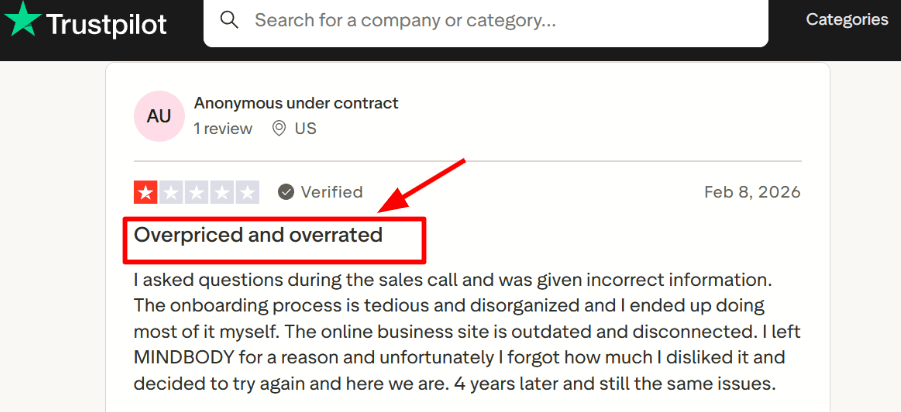
Branded web tools are useful when you want clients to book inside your website flow, though I did notice a few setup screens that took extra clicks and felt dated. That lines up with a negative [Trustpilot review](https://www.trustpilot.com/review/mindbodyonline.com) calling onboarding tedious and the online business site disconnected, so I’m sharing a screenshot below for context.
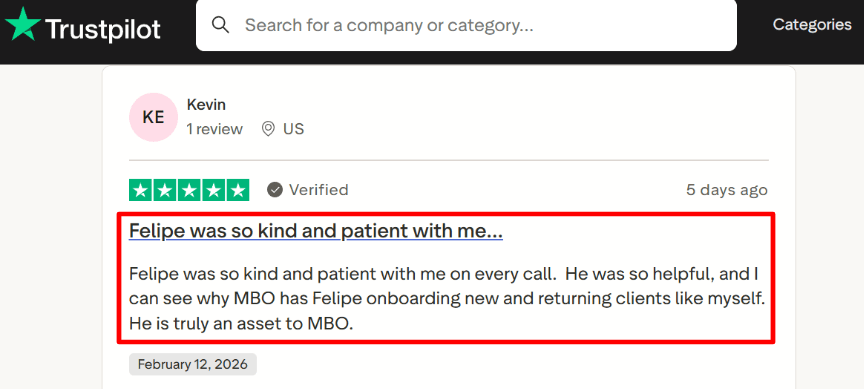
On the other hand, the onboarding experience can be very good when you get the right specialist. I saw a detailed [Trustpilot review](https://www.trustpilot.com/review/mindbodyonline.com) praising an onboarding rep for being patient and helpful, and I’m adding that screenshot below too.
Red flags
– If you’re a small studio that only needs simple class signups and basic payments, Mindbody can feel heavy for the job and the cost can be hard to justify compared to leaner fitness class scheduling software options.
– Start with what you’ll actually use, then sanity-check the baseline on the [Mindbody pricing page](https://www.mindbodyonline.com/business/pricing).
– Onboarding quality varies. Some teams love the handholding, others end up self-implementing more than expected, so plan time for setup and internal training.
Pricing
– Mindbody advertises plans starting at $99 per month per location, and higher tiers typically depend on what you bundle. See the latest details on the official [Mindbody pricing page](https://www.mindbodyonline.com/business/pricing).
– Budget extra for add-ons you may need later, like branded app or advanced marketing, because the total tends to rise as you scale.
– I’d price it out using your real schedule and staff count for one month, then decide if the reporting and operational depth will pay for itself.
If your website experience is your main sales funnel, expect to spend time polishing widgets and client flows so the booking journey feels modern on Mindbody.
Vagaro
If your studio has grown past spreadsheets and DMs, you need a booking flow that stays fast on mobile and keeps your schedule clean. Vagaro is popularly known as an all in one system for beauty and wellness businesses, and it also targets fitness studios. (vagaro.com)
I’d look at it when your fitness class scheduling software needs to cover more than classes, like checkout, retail, packages, and a front desk workflow.
Who should use this tool
- Fitness studios that run classes plus appointments
Think yoga, Pilates, personal training, and bodywork under one roof. Vagaro was built around beauty and wellness operations, so it fits when you need both schedules. (vagaro.com) - Owners who want booking plus checkout in the same system
If you want booking tied to payments and POS style checkout, Vagaro’s pricing and hardware ecosystem make that a core theme. (vagaro.com) - Teams that need multi calendar operations
I’d consider it when you have multiple instructors or providers and you want one place to manage staff calendars, tasks, and daily flow. (Vagaro Support) - Businesses doing virtual classes or remote consults
If live classes matter, Vagaro leans into a built in live stream flow where each booking can generate a unique meeting link. (vagaro.com) - Anyone planning a migration this year
One detail I paid attention to is Vagaro acquiring Schedulicity, which signals ongoing consolidation in this category and can affect long term platform direction. (Business Wire)
Features
- Online booking flow
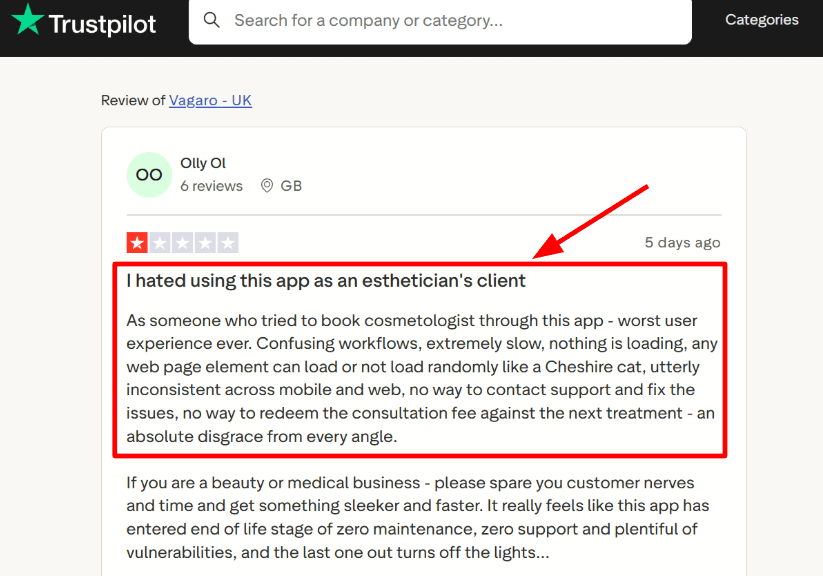
In my test setup, creating a class and taking a test booking was straightforward, but the client side experience can feel heavy on some devices. I also saw the same kind of slow, confusing booking complaint in a Trustpilot review, so I’m sharing a screenshot below. (Trustpilot)
- Calendar integration
Vagaro supports syncing with Google Calendar in both directions. When I enabled it, the settings were granular enough to decide what flows each way, which matters if coaches also live inside Google Calendar. (Vagaro Support) - Availability controls
I like that you can tune calendar configuration settings inside the scheduling system, since availability is usually where studios get messy fast. My only hiccup was finding the exact setting path the first time on desktop. (Vagaro Support)
- Payment integration
Vagaro pushes payments and checkout as part of the core workflow. For studios that sell packs, memberships, retail, and services, that all in one checkout story can reduce tool sprawl. (vagaro.com) - Meeting link automation
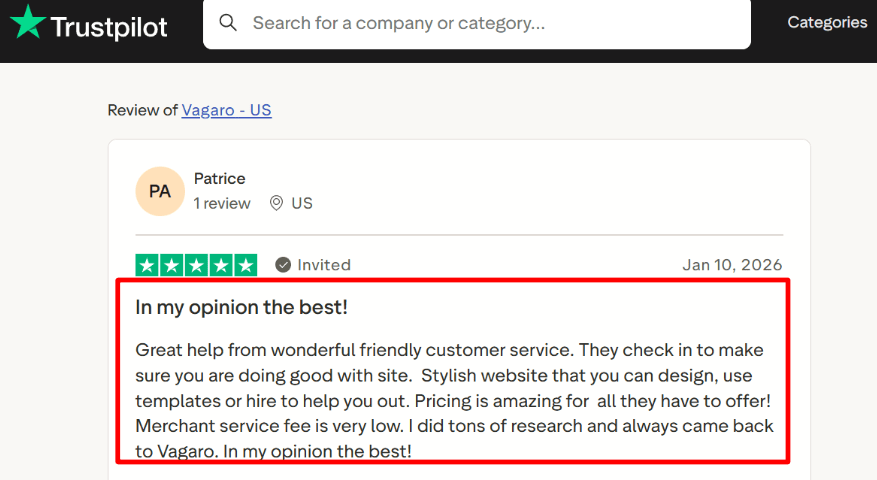
For virtual sessions, Vagaro’s live stream flow can send automated confirmations that include a join link, and it updates attendees if you reschedule. I also saw a Trustpilot review praising how easy it felt to get help by phone when stuck, and I’ve added a screenshot below for readers to scan. (Vagaro Support)
Red flags
- If you only need clean, fast class booking
When your business is primarily recurring group classes and member rebooking speed is the whole game, a dedicated fitness class scheduling software can be simpler for clients. - The client side performance and workflow complaints show up in Trustpilot feedback, so I would weigh that carefully. (Trustpilot)
- Add ons can stack
Some capabilities are priced as premium features, so the monthly total can grow as you turn on more modules. (Vagaro Support) - Security claims are strong, but verify your exact needs
Vagaro lists a broad set of security and compliance claims. If you operate in a regulated niche, confirm what applies to your specific workflow and data types. (vagaro.com)
Pricing
- Vagaro’s base subscription is shown at about $23.99 per month in the US, and pricing varies by country. (Vagaro Support)
- Plans scale with bookable calendars and optional premium features, so multi instructor studios should model the real monthly total before migrating. (Vagaro Support)
- I’d budget for a base plan plus any must have add ons, then test your full booking flow on mobile before committing. (Vagaro Support)
If your fitness business runs classes plus services and you care about front desk checkout, Vagaro is worth testing. If your top priority is a lightweight, member-first class booking experience, I’d shortlist dedicated fitness class scheduling software alongside it.
WellnessLiving
If your class software also needs to handle memberships, prepayments, staff operations, and client follow-up, WellnessLiving is one of the more complete options in this space. Compared with a basic fitness class scheduling software tool, I would look at it when the schedule is only one part of the business and you also need billing, client records, and retention tools in the same system.
When I went through the setup flow, that showed up quickly. You are creating classes, passes, forms, reminders, staff rules, and mobile booking at the same time. That can be useful for growing studios, though I did feel I had to read the pricing page more carefully than usual before I felt clear on the real cost.
Who should use this tool
1. I would look at WellnessLiving if you run a gym, yoga studio, Pilates studio, dance school, martial arts school, bootcamp, or another fitness class business that sells more than drop-in classes. It fits better when you need recurring revenue, class packs, courses, and staff coordination in one place.
2. It also makes sense for studios that mix group classes with private sessions or consultations. I found that useful because many fitness businesses eventually outgrow software that only handles a class timetable and simple bookings.
3. This is a stronger fit for operators who want the booking flow tied closely to payments, client forms, reminders, and a branded app. If your front desk spends too much time chasing waivers, follow-ups, or purchase questions, this kind of setup starts to make more sense.
4. Multi-instructor and multi-location teams should pay more attention here. WellnessLiving’s staff tools and enterprise direction feel built for businesses that are already scaling, and [FitTechGlobal coverage](https://www.fittechglobal.com/fit-tech-news/WellnessLiving-partners-with-McCarthy-Capital-to-fuel-global-expansion/349971) noted the company’s funding was meant to support expansion and multi-site product development.
5. I would skip it if your business is very small and you only need a lightweight weekly schedule with online checkout. In that case, a simpler fitness class scheduling software tool may be easier to live with day to day and easier to budget for.
Features
1. Packages and prepayments
This is one of the reasons studios choose WellnessLiving. You can sell casual visits, memberships, course-style purchases, and prepaid options through the same system, which is useful when classes and revenue models vary by instructor or program.
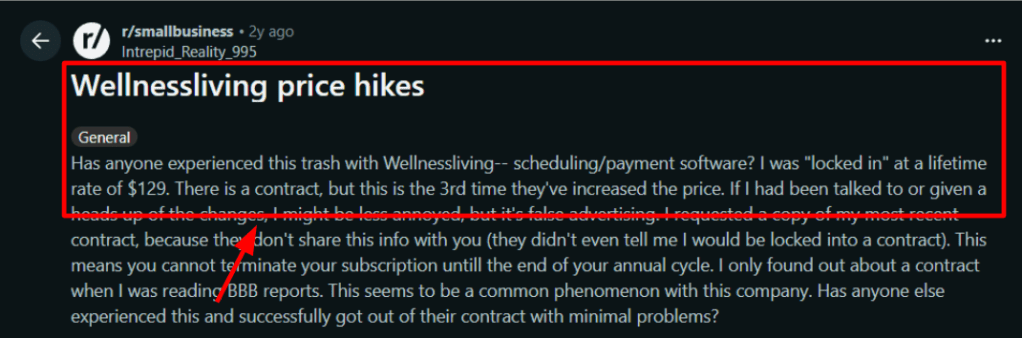
I can also see why the Reddit complaint you shared below matters here. Once billing and recurring purchases sit inside the platform, price changes or annual lock-in become more painful for the operator reviewing that screenshot.
2. Client app flow
The client side is stronger than what I see in many class-first tools. The [G2 review](https://www.g2.com/products/wellnessliving/reviews) you shared lines up with what I saw here: booking and prepayments are easy to follow, and the mix of client app, forms, and optional AI help makes the experience feel more complete.
If readers check the screenshot below, that review is especially useful for dance, Pilates, and other fitness class businesses where clients buy in several different ways.

3. Waitlist control
WellnessLiving’s [online booking page](https://www.wellnessliving.com/features/online-booking/) goes deeper than a simple waitlist. It supports configurable waitlists, automatic promotion, manual promotion, and rules around when those promotions happen before class starts.
I liked this because it helps protect revenue on fuller schedules. It is more useful in practice than a basic join-the-waitlist button.
4. Staff availability
The [staff management tools](https://www.wellnessliving.com/features/manage-staff/) are a real reason to shortlist it for growing studios. You can manage staff schedules, tasks, location-specific availability, and substitutions, which matters once several instructors teach across different time blocks or sites.
In testing, this felt closer to an operating system for a studio than a simple class scheduler.
5. Zoom integration
For studios selling virtual classes or hybrid programs, the [Zoom integration](https://www.wellnessliving.com/features/zoom/) is worth noting. It connects live virtual classes, appointments, and events back into the booking flow instead of forcing you to patch everything together manually.
That is useful if your fitness class scheduling software also needs to support online sessions without making admins manage two separate systems all day.
Red Flags
1. If you run a lean single-location studio and mainly need a timetable, online booking, and basic checkout, I would not choose WellnessLiving over a simpler fitness class scheduling software option first. The [WellnessLiving official pricing](https://www.wellnessliving.com/knowledge-sharing/pricing/) shows a broader and more layered stack than that use case usually needs.
2. Pricing can take a bit more sorting than I expected. The official page shows standard plan prices, promotional prices, and extra paid layers like the white-label app and AI tools, so I would map your exact setup before treating the headline number as the real monthly spend.
3. I would also pause if you are sensitive to contract terms or billing changes. The Reddit complaint you shared below is not something I would ignore, especially for studios that plan to run memberships and payments through the same vendor for a full annual cycle.
Pricing
– The [WellnessLiving official pricing](https://www.wellnessliving.com/knowledge-sharing/pricing/) page currently lists Starter at $69 per month or $62 on annual billing. Business is $199 monthly or $179 annually, and BusinessPro is $349 monthly or $314 annually.
– The same page also shows short-term promo pricing on some plans, while add-ons like the white-label app and AI products can change the real total. I would budget for the full setup you need, not the first discounted number you see.
Zen Planner
If your class booking tool keeps spilling into spreadsheets, missed check-ins, and payment follow-ups, Zen Planner is one of the names that comes up fast. It is mostly known for combining class scheduling with member management, recurring billing, attendance, reporting, and gym-specific workflows in one system. Compared with a typical fitness class scheduling software, I would look at Zen Planner when the calendar needs to run the business too, not just fill classes. (Zen Planner)
Who should use this tool
– I would shortlist Zen Planner for CrossFit gyms, martial arts schools, boutique fitness studios, yoga studios, personal training gyms, and broader fitness class businesses that need bookings tied closely to memberships, staff workflows, check-ins, and billing. It fits best when the business runs on repeat attendance and member history, not one-off sessions.
– One outside signal that made this stand out more when I tested it was the [ACSM 2026 fitness trends update], where mobile exercise apps stayed in the top five. That makes member self-service and app-led reservations more important for the same audience that shops for fitness class scheduling software. (Zen Planner)
Features
- Attendance tracking
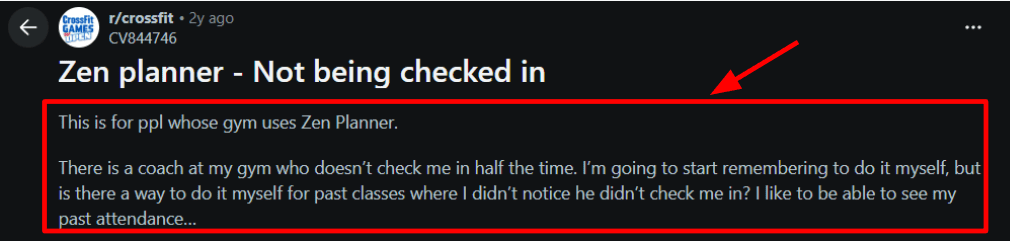
Zen Planner connects booking, check-in, and attendance history in a way that feels built for class businesses, not generic appointment booking. I liked that attendance sits close to the member record, though I also saw a [Reddit review] raising the exact issue of missed coach check-ins and missing past attendance, which is worth seeing in the screenshot below because it shows how much this flow still depends on staff habits. (Zen Planner)
- Member mobile app
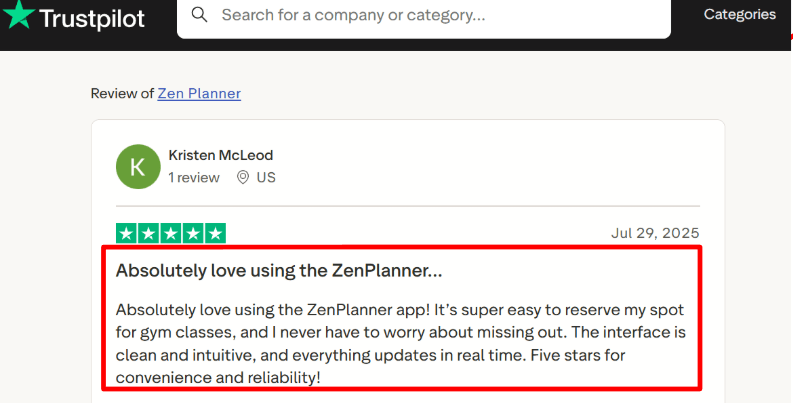
The member side is clearly important here. Reservations, self-service, attendance history, and check-ins are core to the product, and I can see why the [Trustpilot review] you shared praised easy booking and real-time updates. That said, one thing that made me pause is that Zen Planner is still in the middle of rolling toward one unified staff and member app in 2026, so the mobile story is improving but still evolving. The screenshot below fits well here. (Zen Planner)
- Membership billing
This is one of the clearest reasons to pick Zen Planner over a lighter fitness class scheduling software. It ties class access to memberships, recurring billing, payment processing, and member status, which matters a lot once you have packages, failed cards, or family accounts in the mix. In my setup notes, this felt more like operations software with scheduling inside it than a simple class calendar. (Zen Planner) - Calendar integration
Zen Planner can put schedules and forms into your website, and a [G2 review] also calls out embedded calendars plus Zoom support for trial class reservations. I found that useful because it means the system can handle both existing members and new prospects from the same booking surface, which is more depth than many fitness class scheduling software tools give you out of the box. (G2) - Skill tracking
This is where Zen Planner gets more specialized. For martial arts, it supports belt and skill tracking. For CrossFit-style businesses, it leans into workout tracking and SugarWOD. That extra depth will matter a lot for schools and boxes. A small yoga or group class studio may never touch these layers, though they are part of why Zen Planner has such a strong fit in gym-heavy segments. (Zen Planner)
Red flags
- I would skip Zen Planner over a simpler fitness class scheduling software when the business mainly needs a clean booking flow for classes or appointments and does not need deep member management, billing, reporting, or specialized gym workflows. The closest outside signal I found was the [G2 Acuity vs Zen Planner comparison], which says Acuity was easier to use, set up, and administer. (G2)
- Pricing can widen faster than it first looks. The base product starts at $99 per month, though the website add-on, Engage, branded app, and payment-related costs can push the stack up quickly for a smaller studio. I would price the full operating setup before assuming it sits near the cost of a basic class scheduler. (Zen Planner)
Pricing
- On the [official Zen Planner pricing page], Studio starts at $99/month for 0 to 45 active members and scales up to $289/month for 251+. Zen Planner says pricing is based on active members and that it does not charge for staff or prospects. (Zen Planner)
- Add-ons matter here. Website is $99/month, Engage is $249/month, and Branded App is $39/month. Bundles include Essentials from $198, Ultimate from $348, and a New Business Bundle at $199. (Zen Planner)
Best fit by studio type
If I wanted to choose quickly, I would decide based on class packs and memberships, reminders, rescheduling, team scheduling, and how much setup weight I want to carry every week. From everything I checked, these are the clearest fits for this page. (lunacal.ai)
- I would pick Lunacal if I wanted a lighter setup with branded booking pages, payments, reminders, class packs, and scheduling across coaches or locations without moving into a bulky gym system too early. (lunacal.ai)
- I would pick Mindbody if I were running a bigger studio operation and cared most about broad business management, memberships, payments, reporting, and handling high-volume booking in one platform. (Mindbody)
- I would pick WellnessLiving if I needed strong class operations with waitlists, recurring bookings, mobile app usage, memberships, and support for staff working across a busier studio setup. (WellnessLiving)
- I would pick Vagaro if I wanted a popular fitness and wellness tool with class scheduling, reminders, payments, training packages, and a lower entry price for a smaller studio. (vagaro.com)
- I would pick Zen Planner if my business was member-heavy and I needed gym operations, billing, staff management, packages, and a smoother migration path from an older system. (Zen Planner)
Popular fitness software FAQs
I cannot see Google’s live AI Overview directly. I based these FAQ picks on recurring intent across current search results, comparison pages, and fitness software guides around class booking, memberships, reminders, cancellations, pricing, and multi-trainer scheduling. (glofox.com)
- What is the best fitness class scheduling software for small studios?
- What features should I look for in fitness class scheduling software?
- Can fitness scheduling software manage memberships and class packs?
- Does fitness class booking software send SMS and email reminders?
- Can clients cancel or reschedule fitness classes online?
- Can fitness scheduling software handle multiple trainers or locations?
- How much does fitness class scheduling software cost?
- How hard is it to switch from my current fitness scheduling software?
 OnlineSchedulingTools