Key Summary
- Choose Lunacal if you run a pet grooming business that wants a more complete modern booking flow with branded pages, pet intake questions, deposits, reminders, packages, and team routing.
- Choose Calendly if your grooming business mainly needs a familiar scheduler with strong team scheduling, round robin, reminders, and payments, and you are fine with a more general setup.
- Choose Picktime or Setmore if you are a solo groomer or small shop trying to keep software costs low while still getting practical scheduling, reminders, payments, and basic team features.
- Choose Appointy if your business wants a broader service-business booking system with reminders, payments, forms, and customer management, and you are comfortable with a higher starting price.
Introduction
Pet grooming has become a bigger online-booking business than many owners planned for. APPA says the U.S. pet industry reached $158 billion in 2025 and expects continued growth in 2026, which means more pet parents booking online and less patience for phone tag, vague availability, or messy reschedules. So I reviewed Lunacal, Calendly, Appointy, Picktime, and Setmore with one practical question in mind: which tool helps a pet grooming business stay full without adding admin drag.
I checked live product pages, pricing pages, help docs, and review sources, then looked for the details that matter in real grooming shops: service lengths that change by breed or coat, intake questions for behavior or matting, deposits for longer appointments, staff assignment, pickup timing, and reminders that cut no-shows. The findings were cross-checked against current documentation, pricing, and public review signals so the shortlist stays grounded. Below, you’ll quickly see which tool fits solo groomers, multi-groomer shops, and teams that care most about branding, budget, or tighter operations.
Pet grooming scheduling software table
| Tool | G2 rating | Paid price | Calendar sync | SMS/email reminders | Paid meetings | Booking page themes | Team scheduling | Round robin | Multi-session packages | Custom domain | GDPR |
| Lunacal | 4.9 ★★★★★ | $9/user/mo | Yes | Yes | Yes (Stripe, PayPal) | Yes | Yes | Yes | Yes | Yes | Yes |
| Calendly | 4.7 ★★★★ | $10/seat/mo | Partial | Yes | Yes (Stripe, PayPal) | Partial | Yes | Yes | No | Partial | Yes |
| Appointy | 4.5 ★★★★ | $19.99/mo | Yes | Yes | Yes (Stripe, PayPal, Authorize.Net) | Yes | Yes | Yes | Partial | Partial | Yes |
| Picktime | 4.8 ★★★★ | $3/user/mo | Yes | Yes | Yes (PayPal, Stripe, Square) | Yes | Yes | Yes | Partial | Partial | Yes |
| Setmore | 4.5 ★★★★ | $5/user/mo | Yes | Yes | Yes (Stripe, PayPal, Square) | Yes | Yes | No | Partial | No | Yes |
What Pet Grooming Businesses Should Look For
- Start with service setup that supports different appointment lengths, buffers, add-ons, and staff assignment. A bath, deshed, and full groom rarely need the same slot.
- Use intake forms that capture breed, size, coat condition, age, behavior notes, and vaccine details before approval. This prevents bad fits on packed days.
- Choose deposits, reminders, and a simple rescheduling flow. These reduce no-shows, protect longer bookings, and save time when pet parents need to shift pickup.
- Check team scheduling, round robin, and location controls if multiple groomers, vans, or tables are involved. Capacity issues usually appear once bookings grow.
- Review booking-page quality, payment flow, reporting, and migration help. Clean pages convert better, reports reveal peak demand, and imports make switching easier.
Detailed Review of How Each Tool Fits Scheduling for Pet Grooming
The reviews below look at where each option works well, where friction shows up, and which type of grooming business it suits best.
Lunacal
Intro
Lunacal is best known for turning a plain booking link into a stronger booking page, and that matters in pet grooming more than many owners expect. After reviewing the live product and setup docs, I found it more useful than a generalist scheduler when deposits, pet intake questions, buffers, team assignment, and reminders all need to work together. It still behaves more like a modern booking layer than a full pet-grooming operating system.
Who Should Use This Tool
- Solo groomers who get bookings from Instagram, Google, WhatsApp, or referrals and want deposits, cleaner intake, and a booking page that builds trust before the first visit.
- Small shops with multiple groomers, rotating service types, or a salon plus mobile van setup. The team pages, round robin, multi-location handling, and reminders fit that model well.
- Owners moving away from phone tag and manual rescheduling, but not shops that need deep pet records, POS, inventory, and table or tub scheduling inside the same product.
Core Features
- Service Rules
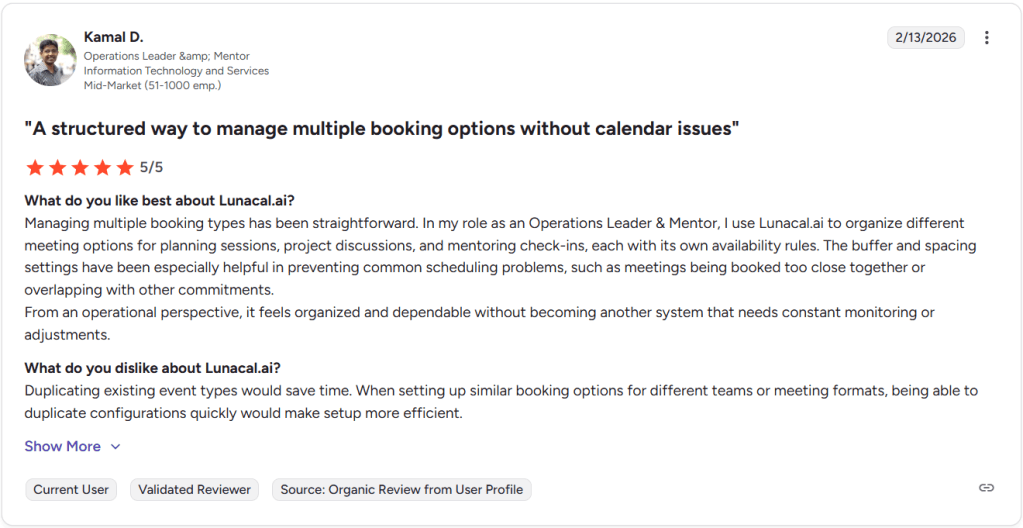
I liked how easy it was to separate a full groom, bath, nail trim, or add-on and give each one its own timing, price, notice period, and cleanup buffer. That is much closer to how a grooming shop runs than a generic meeting tool. The weak point is speed when cloning similar setups. I saw the same issue in a G2 review about duplicating similar booking types, and I’d use that review as the screenshot below because it matches what I noticed while building size-based service variations.
- Pet Intake
Lunacal’s pet grooming flow is unusually specific about collecting breed, coat type, behavior notes, allergies, bite history, and handling details before the appointment. I also like that manual approval exists, because first-time aggressive pets or severe matting consults should not always auto-confirm. That is better than the usual phone-note method many smaller shops still rely on. - Calendar Control
Calendar sync is solid on paper. Lunacal supports Google, Outlook, and Apple, checks conflicts across connected calendars, and gives you buffers, advance notice, and booking windows. A useful detail that basic reviews usually skip is that Capterra currently describes Lunacal as serving salons and other appointment-led businesses with custom durations, notice periods, intake questions, and two-way sync. That lined up with the setup docs I checked. - Payments Flow
For pet grooming, this is one of the stronger parts of the product. Lunacal supports Stripe and PayPal, lets you take payment while booking, and includes coupons and session packages. I would use this for first-time clients, weekend slots, and longer de-shed or hand-scissor appointments where soft bookings get expensive fast. - Trust Builder
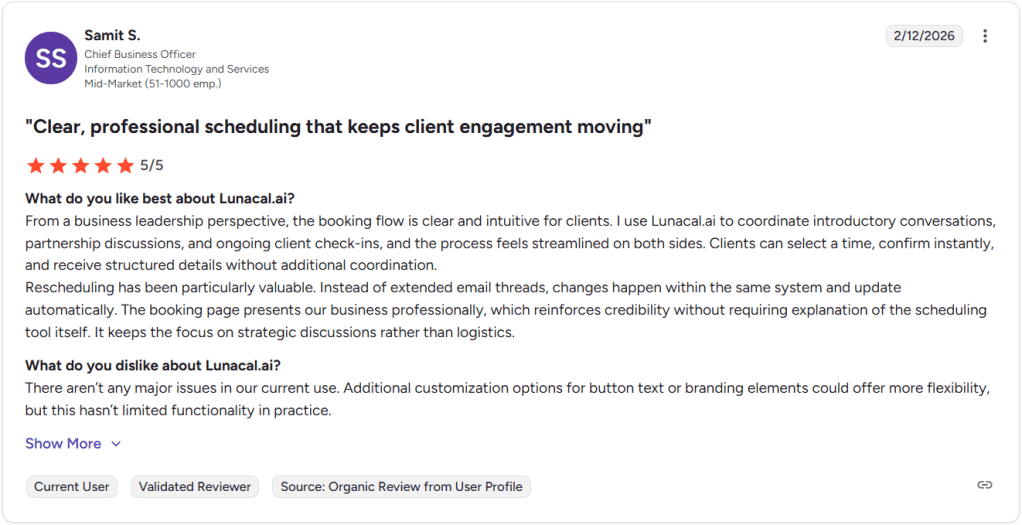
The booking page can carry photos, testimonials, videos, maps, and team details, which matters because pet parents are judging safety and professionalism before they book. I agree with the G2 reviewer who said the flow feels clear and professional for clients. That matched what I saw, and it is the second review I’d place as a screenshot below. Against a basic scheduling link, this page does a better job of selling the appointment.
Red Flags
- If your shop needs native pet profiles, resource scheduling for tubs and tables, and built-in POS tasks like tips, split payments, retail inventory, or gift cards, Lunacal will leave gaps. Even Lunacal’s own pet-grooming pricing guide tells buyers to verify those needs carefully.
- While setting up similar service variants, the extra copying felt slower than it should. G2 feedback shows the same pattern around duplicating paid booking types and adjusting similar setups.
- Mobile still looks lighter than desktop. G2 feedback also points to missing mobile features, which matters if the owner or front desk manages changes on the go.
Pricing
- Lunacal’s current pricing starts at $9 per user per month for Standard, $15 for Teams, and $25 for Enterprise, with a 7-day free trial.
- For most pet grooming businesses, I’d start by thinking less about the base tier and more about staff seats, deposits, reminders, and how many locations or workflows need to be live.
Calendly
Intro
Calendly is best known for taking the back-and-forth out of booking. After setting it up, I’d use it for a pet grooming business that wants a clean client-facing scheduler with calendar sync, reminders, payments, and simple team coverage. Compared with phone calls, DMs, or a contact form, it feels much cleaner. Compared with pet-grooming software, though, it stays closer to a booking layer than a full operating system.
Who Should Use This Tool
- Solo groomers who want clients to self-book baths, trims, or full grooms without the usual texting loop.
- Small teams that need shared availability, reminders, and a polished booking page, but do not need pet records or retail tools inside the same product.
- Shops where Calendly’s broad service-business setup still fits pet grooming because the main need is better scheduling, deposits, and fewer no-shows.
Core Features
- Calendar Sync
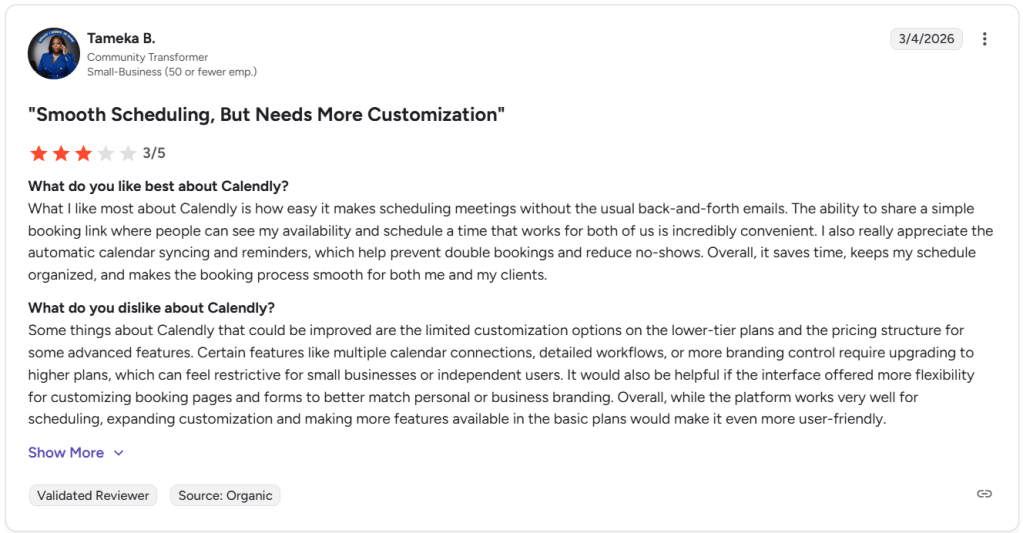
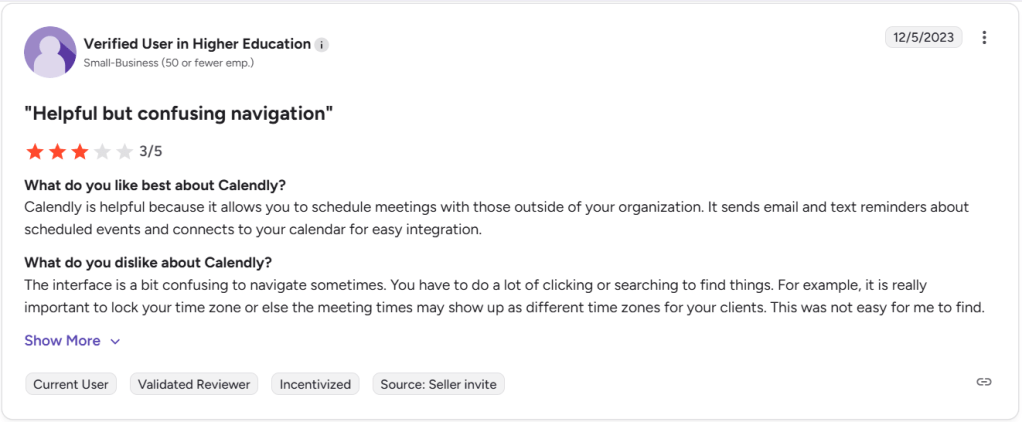
I found setup pretty quick. Calendly connects to supported calendars, checks them for conflicts, and auto-adds bookings, which already makes it feel better than the usual phone-and-notebook routine. One G2 review praised the simple booking link, auto sync, and reminders. But it also mentioned limited customization on lower tiers, especially if a shop wants different intake for puppy trims, senior dogs, and full-groom services. I’m attaching that screenshot below too.
- Booking Questions
You can add up to 10 custom questions per event type and make them required, which is useful for coat type, dog size, or behavior notes. This is also where I hit the ceiling. One thing Capterra surfaced that basic review roundups usually miss is that users specifically mention trouble tailoring intake questions across event types, and that matters a lot in grooming. - SMS Reminders
Email and text reminders are one of Calendly’s stronger day-to-day wins. Another G2 review said the reminders and calendar connection were helpful. I agree, especially for reducing no-shows and cutting follow-up calls from the front desk. I’m placing that screenshot below because it matches the real value here.
- Upfront Payments
Calendly connects with Stripe and PayPal, lets you collect payment during booking, and sends the money straight to your payment account. For pet grooming, that is useful for deposits on longer appointments or first-time bookings where a missed slot costs real money. - Team Rotation
If you have multiple groomers, shared Round Robin can automatically book the next available person. That is handy for small shops that want front-desk simplicity without moving into heavier salon software too early.
Red Flags
- For shops that need different intake flows for puppy grooms, matted-coat work, and anxious-pet bookings, Calendly starts to strain because lower tiers feel tight and users on Capterra specifically mention trouble tailoring intake questions across event types.
- I also needed more clicking than I wanted. The time-zone lock is there, but it is easier to miss than it should be, which can create avoidable confusion for clients.
- I would not use it as the only system if you need pet profiles, package history, retail checkout, or staff-resource planning. That is my read after comparing Calendly’s official feature set with what grooming software usually covers.
Pricing
- On Calendly’s official pricing page, Free is $0, though it is too limited for most grooming businesses because it includes one event type and one connected calendar.
- Standard is $10 per seat per month billed yearly, and this is the first tier I’d seriously consider for a solo groomer because it adds unlimited event types, payments, reminders, and more integrations.
- Teams is $16 per seat per month billed yearly and makes more sense for shops that need round robin, routing, and stronger admin control.
Appointy
Intro
I found Appointy strongest for pet grooming shops that need more than a basic booking link, but do not want a huge salon system. It brings online scheduling, reminders, deposits, staff calendars, and intake forms into one setup. Compared with generalist schedulers or phone-and-text booking, it gives a grooming business a much cleaner operating base from day one.
Who Should Use This Tool
- Solo groomers who want clients to book, pay, and get reminded without manual follow-up.
- Small grooming teams that need staff calendars, repeat bookings, and Google or social booking access.
- Shops that mainly run on appointments and simple pet intake, rather than boarding-heavy or medical-style workflows.
Core Features
- Booking Flow
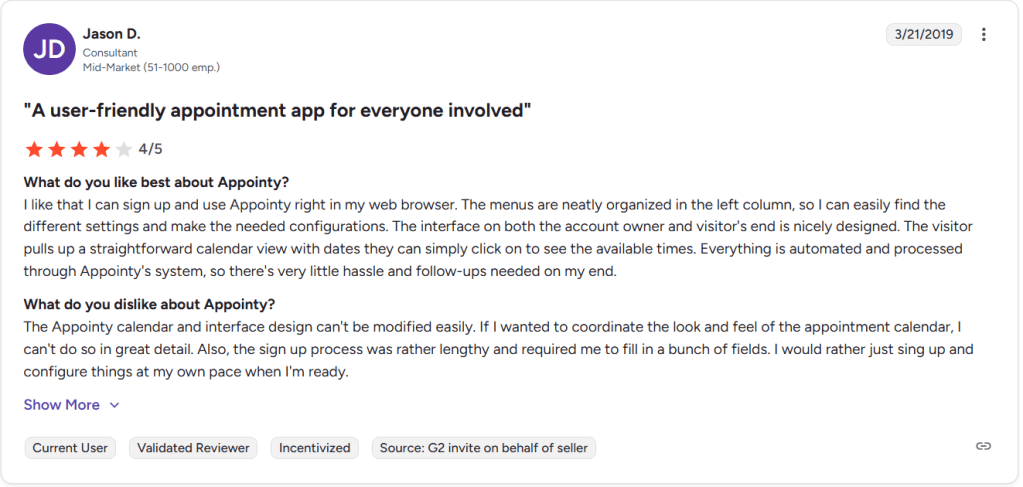
When I looked through the setup and booking experience, this was one of the clearer parts of the product. A G2 reviewer said the menus were easy to find in the left panel and the visitor calendar was simple to use, and that matched what I saw. For a grooming shop moving away from calls and DMs, that matters a lot. However, they also found the interface and calendar design to be a bit limited in modification, and that matches up with what I found during my testing. I’m sharing the screenshot below.
- Client Intake
Appointy lets you collect pet details through forms and store client history, which is a real step up from standard industry habits where groomers take notes over text or at the front desk. That makes it easier to capture things like coat concerns, allergies, or service preferences before the pet arrives. - Calendar Sync
I like that Appointy puts real emphasis on availability, calendar sync, and reminders. That is where many generalist tools stop short for a grooming team with staggered slots and multiple staff calendars. G2 feedback also highlights easy calendar syncing and helpful reminders, which lines up with the product’s positioning. - Deposit Payments
The payment layer is useful for pet grooming because no-shows and late cancellations hurt fast. Appointy supports prepayments and connects with payment tools, so you can reduce back-and-forth and lock in more serious bookings before a slot is reserved. - Flexible Setup
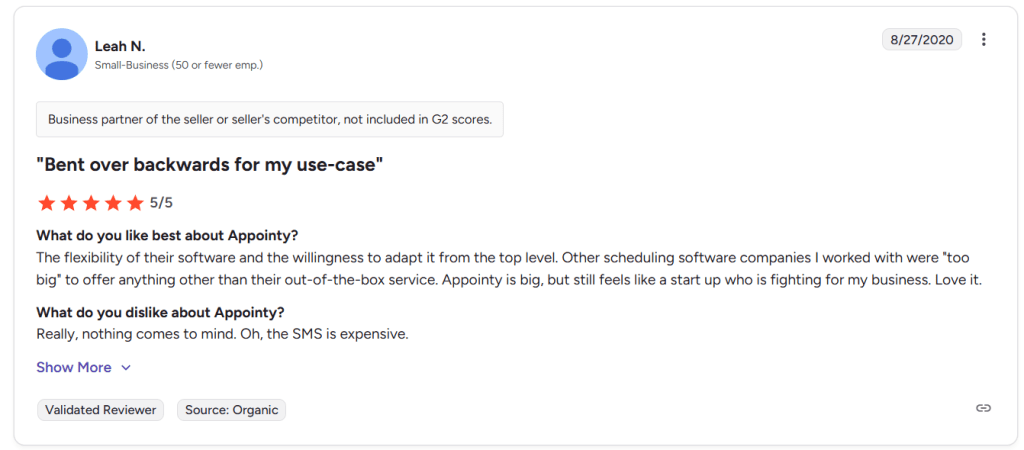
One G2 reviewer said Appointy bent over backwards for a unique use case. I partly agree. I would not treat it as deeply custom software out of the box, but I do think it looks more adaptable than many large scheduling tools that force you into a fixed flow. However, they did consider the SMS prices to be quite expensive, so I’m sharing that screenshot below. One extra nuance I liked: a Capterra review from a dog training business praised the easy onboarding and price, which is a useful pet-adjacent signal most roundups miss.
Red Flags
- If your shop also needs boarding, kennel management, vaccine tracking, or richer pet-operating workflows, Appointy looks much more like a scheduling-first tool than a deep pet-business system on its pet services page.
- The booking page customization felt a bit limited once I compared it with more brand-led tools. That also shows up in the G2 review about the interface being hard to modify in detail.
- SMS pricing can add up, as one G2 reviewer called that out directly. That is worth watching if your reminder volume is high.
Pricing
- Free: $0 per month. Good for testing, but limited to 1 staff, 5 services, and 100 appointments.
- Growth: Starts at $19.99 per month billed annually, or $29.99 month to month.
- Professional: Starts at $49.99 per month billed annually.
- Enterprise: Starts at $79.99 per month billed annually. Full details are on Appointy’s official pricing page.
Picktime
Intro
When I set up Picktime, it felt like a budget-friendly scheduler for service businesses that need booking, reminders, calendars, and payments without much complexity. For a pet grooming shop moving beyond a paper diary or a very general calendar app, it covers the essentials well. I’d start here if low cost matters more than deep pet records or a polished front-desk experience.
Who Should Use This Tool
- Solo groomers who want self-booking, reminders, and basic payments without paying salon-software prices.
- Small grooming teams with fixed shifts, repeat visits, or a salon plus mobile van.
- Owners who care more about affordable scheduling than deep pet profiles, intake logic, or advanced client communication.
Core Features
- Staff Setup
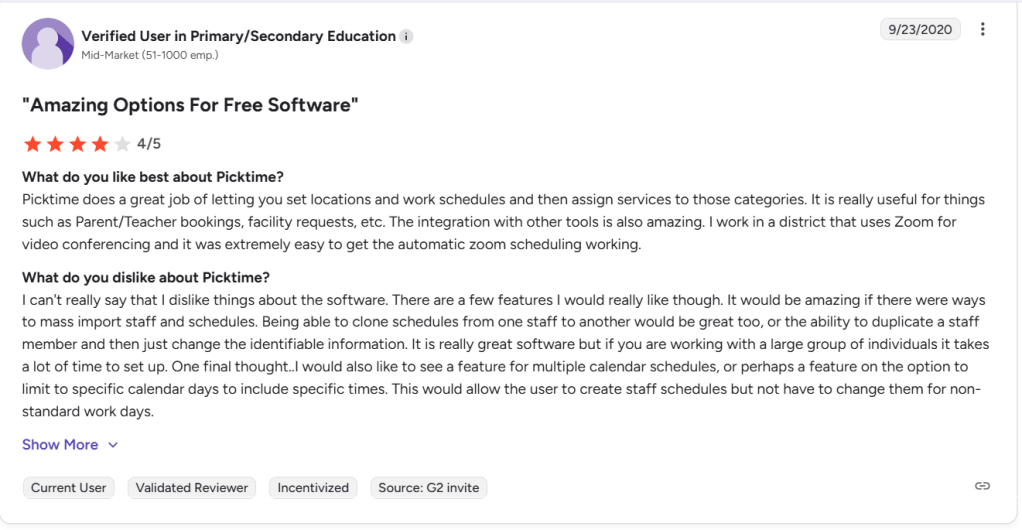
I liked how Picktime lets you map services, staff schedules, and locations in a way that fits grooming shops with separate bath, trim, and mobile slots. I also saw this same strength in a G2 review that praised how easy it was to set locations, schedules, and service assignment. That supports what I saw firsthand. I’m sharing a screenshot below.
- Calendar Sync
Two-way sync with Google, Outlook, and iCloud is useful once groomers start blocking lunch, personal appointments, or van travel time outside Picktime. That said, I also saw a G2 reviewer ask for mass staff import, schedule cloning, and more flexible calendar patterns. I agree with that. Once you have several groomers, setup slows down fast. I’m sharing a screenshot below. - Booking Page
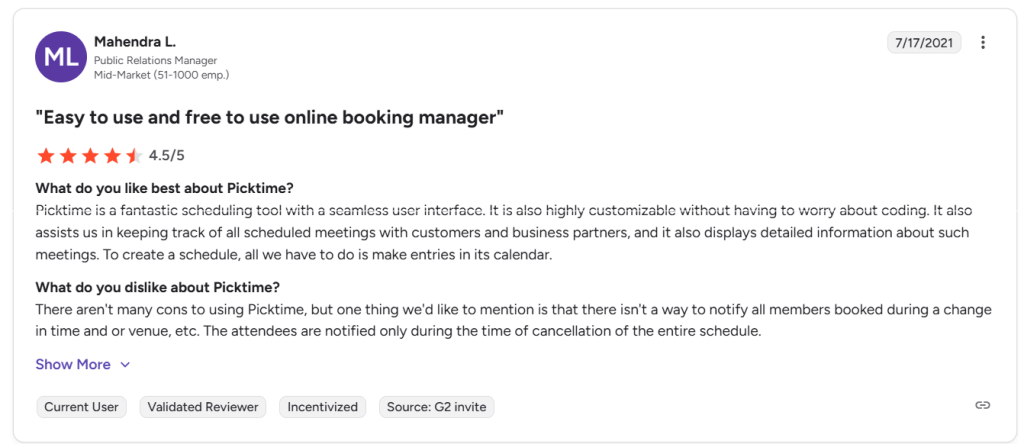
Picktime gives you a branded booking page where clients can choose services, staff, and times without calling the shop. I mostly agree with a G2 reviewer who said it is easy to use and customizable without code, because getting a simple page live was straightforward. However, they pointed out that there isn’t an way to notify all members booked during a change in time or venue. I’m sharing a screenshot below. One deeper point basic roundups miss: a Capterra reviewer said the booking window itself confused clients, which matters a lot in pet grooming.
- Payment Collection
Picktime supports PayPal on Free, with Stripe and Square on paid plans, so you can collect deposits or full payment at booking. Compared with taking appointments by phone and chasing payment later, this is a cleaner flow for no-show protection. For pet grooming, that matters most on longer appointments, premium packages, and repeat clients who book ahead. - Repeat Visits
Recurring bookings, reminders, and timezone handling are useful for pet parents who rebook every few weeks. I also liked that Picktime’s pet-services pages clearly talk about multi-salon setups, mobile units, and shift management. That makes it more relevant than a plain meeting scheduler, even though it still stops short of being true pet-grooming operations software.
Red Flags
- For a grooming shop taking bookings from Instagram, Google Business Profile, or SMS, Picktime can fall short in the booking flow. A Capterra review noted confusing booking-window pop-ups and clients needing to hunt for the right available day, which is the kind of friction that can cost real appointments.
- The first time I tried thinking through setup for multiple groomers, different shifts, and changing weekly patterns, the flow felt more manual than I wanted. G2 feedback about missing schedule cloning and mass staff import matches that concern.
- Change notifications look thinner than I’d want for team reschedules. A G2 reviewer noted attendees are not broadly notified for time or venue changes unless the schedule is cancelled, which can get messy when a groomer swap happens late.
Pricing
- On the official pricing page, Free is $0 with 3 users, 3 resources, 2 locations, unlimited appointments, and PayPal payments.
- Starter is $3 per user/month billed annually.
- Pro is $2.25 per user/month billed annually, with round robin, waitlist, coupons, multilingual booking pages, and more advanced booking controls.
Setmore
Intro
Setmore is popular because it gets a small service business online fast: booking page, reminders, payments, team calendars, and Google visibility without a long setup. When I look at it for pet grooming, it works best as a polished upgrade from phone calls, DMs, and paper diaries. Compared with many bare generalist schedulers, it gives local businesses more ways to get booked.
Who Should Use This Tool
- I’d use Setmore for a solo groomer who wants online booking, deposits, reminders, and a cleaner customer experience without spending weeks setting things up.
- It also fits a small pet grooming team that needs separate staff calendars, a shared booking page, and easy website, Instagram, Facebook, or Google entry points.
- I would look elsewhere if the shop needs pet records, breed-specific workflows, mobile grooming operations, strong POS depth, or more specialized pet-care software logic.
Core Features
- Service setup
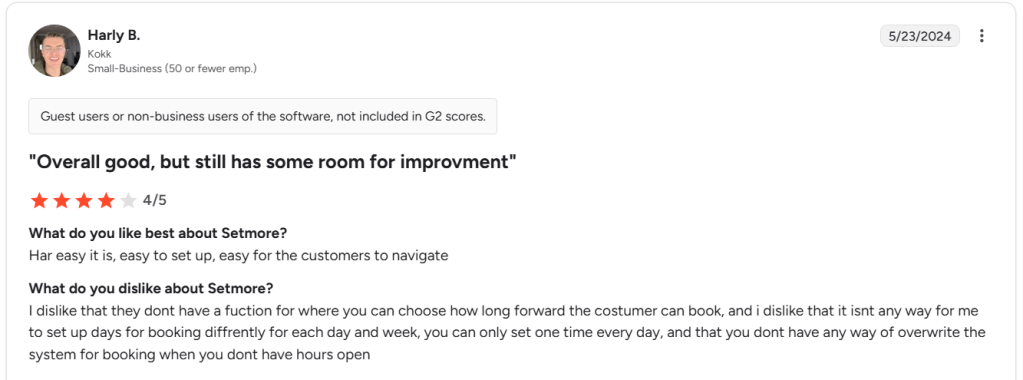
When I tested the structure on paper for a grooming shop, I liked that Setmore can handle public booking and internal appointment management in the same system, while also letting you create multiple services and edit availability. A recent G2 review said service-specific day rules are limited and Google Calendar can need reconnecting. I am attaching the screenshot for that below.
- Booking reach
Setmore is stronger than standard call-and-text booking because it gives you a booking page, website widget, Instagram button, Facebook button, and Reserve with Google. For a pet groomer, that matters because many first-time clients find a local shop on Google Maps and want to book right there instead of calling during a busy shift. - Client booking flow
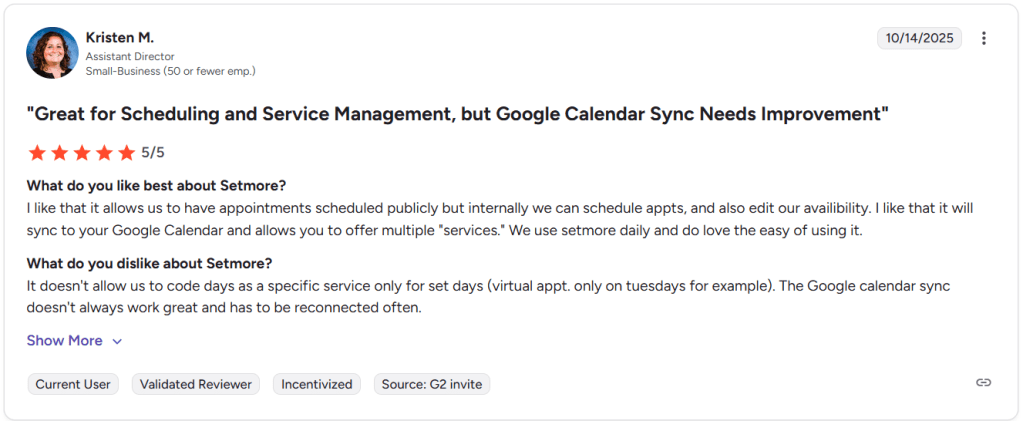
I mostly agree with the 2024 G2 review that said Setmore is easy to set up and easy for customers to navigate, and I’ve shared that screenshot below too. That part felt true. Where I only partly agree is availability depth: once you start thinking through uneven grooming days, late drop-offs, or blocked windows, the rules feel thinner than what some pet-care teams will want.
- Payments and sync
Setmore covers the basics well here: deposits, online payments, in-person payments, Tap to Pay, and integrations with Stripe, PayPal, and Square. It also includes calendar sync, with 2-way sync on Pro. For a grooming business, that is enough to move beyond chasing people over text, collecting payment manually, and updating a second calendar by hand. - Pet prep details
One useful pet-specific touch is that Setmore pushes groomers to collect extra details through the booking page, like allergies or coat-related notes, and to add buffer time between appointments. The deeper point basic reviews often miss is that Capterra’s pet grooming category shows buyers consistently value reminders, customer database, POS, mobile grooming, recurring appointments, and service catalog depth. That is a helpful lens because Setmore covers reminders and booking reach well, but it still behaves more like a general scheduler than a true pet grooming operating system.
Red Flags
- If your shop offers puppy baths only on Saturdays, senior-dog slots only midweek, or different wash-only windows during shedding season, Setmore can break down. A G2 reviewer flagged the same issue around assigning specific services to specific days, and that is the first workflow gap I’d worry about for pet grooming.
- For a grooming-heavy operation, Setmore still feels like a scheduler first. Capterra’s pet grooming category highlights customer database, POS, mobile grooming, and recurring appointments as high-value features, which tells me many grooming businesses will eventually want deeper pet-specific records and workflows.
- The part that gave me pause was pricing clarity. The official page mixes monthly and annual numbers in a way that takes a second read, and some of the more meaningful upgrades such as SMS reminders and 2-way sync sit behind Pro.
Pricing
- Free starts at $0 for up to 4 users and includes a booking page, payments, email reminders, and up to 200 appointments per month.
- Pro is currently shown at $12 per user monthly, with annual pricing shown at $5 per user, and adds unlimited appointments, SMS reminders, recurring appointments, and 2-way calendar sync.
- Before publishing a comparison, I’d verify the live checkout against the official pricing page, because the pricing layout is not the cleanest at first glance.
Conclusion
- Lunacal fits solo groomers and multi-groomer shops that care about branded pages, pet questions, deposits, reminders, and round robin.
- Calendly fits teams that want a familiar scheduler with strong team coverage and payment support.
- Appointy fits service businesses that want forms, reminders, payments, and broader customer-management features in one place.
- Picktime fits budget-first shops that still need staff calendars, payments, recurring bookings, and basic team control.
- Setmore fits small local teams that want easy booking reach through their site, Instagram, Facebook, and Google.
FAQs
1. What is the best scheduling tool for pet grooming?
For this page, I’d put Lunacal first when you want stronger booking pages, pet intake, deposits, and team routing; Calendly works well for familiar team scheduling; Appointy is a broader service-business option; Picktime and Setmore are the stronger budget picks.
2. What features matter most in pet grooming scheduling software?
The recurring essentials are online booking, reminders, customer and pet details, service catalog depth, recurring appointments, team scheduling, payments or deposits, and in some cases mobile-grooming support. Capterra’s pet-grooming category highlights confirmations and reminders, customer database, mobile grooming, online booking, POS, recurring appointments, and service catalog as commonly valued features.
3. Can clients pay online when they book a grooming appointment?
Yes. The main tools in this comparison support online payments or deposits, including Lunacal, Calendly, Appointy, Picktime, and Setmore, though the gateways and plan limits vary by product.
4. Do automated reminders help reduce no-shows for pet grooming?
Yes, they usually do, because they confirm the appointment automatically and reduce front-desk follow-up. For pet grooming, reminders matter even more when the slot is long, the client is new, or you are taking deposits for premium services.
5. Can one scheduling tool handle multiple groomers or mobile vans?
Yes for multi-groomer scheduling, though depth varies: Lunacal supports team scheduling and locations, Calendly supports round robin, Appointy supports staff calendars, Picktime supports users, locations, and resources, and Setmore supports team booking. For heavier mobile-grooming operations, you may eventually want software built more tightly around pet-business workflows.
6. Do I need pet-grooming-specific software, or can a general scheduler work?
A general scheduler is enough when your main pain is booking, reminders, payments, and staff calendars. Once you need deeper pet records, customer database depth, mobile grooming, POS, or broader day-to-day operations, the pet-grooming-software category points toward more purpose-built tools.
7. Can I add online booking to my Google Business Profile?
Yes. Google supports bookings through eligible providers or booking links, and Google says provider bookings can appear on your profile within about a week. In this comparison, Appointy and Setmore both publicly support Google booking flows.
8. Is there a free pet grooming scheduling tool?
Yes. Setmore has a free plan, Picktime has a free plan, and Appointy has a free tier as well. In practice, free plans are best for testing or very small setups, because team size, advanced reminders, branding, and richer controls usually push a grooming shop onto a paid tier.
 OnlineSchedulingTools
Leave a comment